






 See Compatible Printers
 Read more about our ink!
Xerox
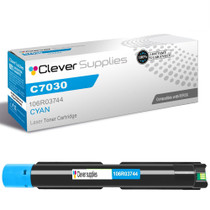
Compatible Xerox C7025 (106R03744) Toner Cartridge Cyan
- Page Yield:
- Color: 9800
- Availability:
- In Stock
- Shipping:
- Free Shipping

Amazon Price:

- Page Yield:
- Color: 9800
- Availability:
- In Stock
- Shipping:
- Free Shipping
- Compatible Printers
- Specifications
- SKU:
- CS-Xerox-C7030-VERSALINK-C7025-C
- Printer Brand:
- Xerox
- OEM Number:
- 106R03744
- Ink Color:
- Cyan
- Page Yield:
- Color: 9800
- Printer Type:
- Laser Cartridge
- Condition:
- New Compatible
- Description
- Reviews

/> 

Achieve exceptional print quality with the Xerox C7030 toner cartridge series, featuring 106R03741 Black, 106R03744 Cyan, 106R03743 Magenta, and 106R03742 Yellow. These compatible Xerox cartridges are designed to produce deep blacks and vivid, rich colors for all your printing needs. Built for reliability and performance, the Xerox C7030 toner cartridge delivers consistent output and sharp results across every page. Whether you're printing everyday office documents or high-resolution graphics, these cartridges ensure professional-quality prints from start to finish. Compatible with VERSALINK C7020, VERSALINK C7025, and VERSALINK C7030 printers, these toner cartridges are easy to install and work seamlessly with your Xerox device. Their precision engineering supports efficient printing and minimizes downtime. Trust the Xerox C7030 toner cartridge to handle demanding workloads with ease. Designed for business environments that require high-performance printing, these cartridges provide the clarity, color accuracy, and durability your work depends on.
Frequently Asked Questions
We print a lot of 11×17 — why does cyan disappear faster on the big sheets?
Because the 9,800-page rating for this 106R03744 is counted on letter-size pages at standard coverage. An 11×17 sheet carries roughly twice the printable area, so a tabloid poster or ledger spread spends about two letter pages' worth of toner — and a full-bleed design spends far more than that. On a Versalink C7025 doing regular A3 work, treat the rating as a ceiling and let the printer's own level gauge tell the real story.
Our proofs look fine on screen but the printed blue is off-brand — can toner cause that?
It can, and aging cyan is the usual suspect. Brand blues are precise mixtures; as the cyan supply weakens, the mixture leans on magenta and yellow, so a crisp corporate blue prints teal or dull. If the shift crept in gradually over weeks rather than appearing with a new file or a new paper stock, the cartridge is confessing. A fresh unit restores the balance without touching your color profiles.
Does running the C7025 mostly in black-and-white spare the cyan?
Mostly, yes. Pages printed in true monochrome draw on the black cartridge alone, so a C7025 that lives on contracts and invoices can stretch one cyan cartridge across a very long season. The exception is "rich black" output — deep, glossy blacks in graphics are blended from all four toners — and the machine's periodic calibration cycles, which use a whisper of each color. Neither changes the headline: mono-heavy use means cyan is the last cartridge you will think about.
How do I check the real cyan level before a big run?
Two ways, both quick. On the machine, the supplies screen shows each cartridge's remaining percentage. From your desk, the printer's embedded web page reports the same levels in a browser — handy when the C7025 sits on another floor. Checking before a 500-page mailing costs ten seconds and beats discovering an empty tank on page 300.
Will this cartridge also fit the models above and below the C7025?
Yes. The C7025 sits in the middle of one shared platform: the same 106R03744 loads into the Versalink C7020 below it and the Versalink C7030 above it. Offices running more than one of the three can stock a single cyan and stop worrying about which machine it belongs to.
What backs this purchase if something goes wrong?
A 1-year warranty covers the cartridge, and returns stay free for a full year — the complete terms are on our shipping and returns page. We ship from warehouses in Illinois, Pennsylvania, Georgia and California, and support is available Monday to Friday, 9 AM to 5 PM CST if you want a human to walk through anything.
How do I prove cyan is the cartridge at fault before I order one?
Print the machine's own color test page and read the patches separately. Each supply is laid down alone there, with no partner colors to hide behind, so a weak or streaky cyan block standing next to three healthy ones settles the question in seconds. That is a far firmer basis for ordering a 106R03744 than a suspicious-looking photograph, because photographs mix all four toners and can blame the wrong cartridge. If the cyan patch is pale or broken, order with confidence.
Cyan drains slowly here — how do we stop it surprising us before a big run?
Give it a calendar habit instead of watching the output. A cartridge that lasts a season gives almost no visible warning in everyday documents, so make the supplies screen part of a monthly routine: one glance, noted in a diary or a shared note, and the level's slow march becomes predictable. When the reading finally crosses into low territory, order the replacement then — weeks before the cartridge is actually empty — and the big run never meets a shortage.
What record should we keep when this cartridge goes in?
Write two things on the carton end before it goes into the cupboard as the emptied box: the fitting date and the machine's total counter at that moment. When this 106R03744 eventually comes out, the same two figures from the next box let you calculate exactly how many pages and months a cyan cartridge serves on your C7025. That private track record beats any published rating for planning, because it already includes your A3 work, your coverage and your copying habits.
Once the new cartridge is printing clean blues, what happens to the old one?
Keep the spent unit physically separate from your sealed stock and clearly spent — a mark on its carton prevents the classic accident of refitting an empty cartridge during a busy search. Once the replacement has proven itself on real work, the old 106R03744 leaves through the office's normal route for used toner cartridges. If output problems were the reason for the change, hold the old unit until those problems are confirmed gone, since it is useful evidence either way.
About This Xerox 106R03744 Cyan Toner Cartridge
Built for the middle of the VersaLink C7000 line, this compatible cyan cartridge — part number 106R03744, priced at $95.14 — is rated for up to 9,800 pages, which works out to about 0.97 cents per standard page. It is the cartridge for shops that lean on the C7025's A3 tray: posters, ledger reports and proofs where cyan does the heavy lifting in skies, water and brand blues. One cartridge, one platform, no guesswork about which supply your machine wants. Browse the rest of the range on our Xerox page.
Related Items

Xerox
Compatible Xerox C7030 (106R03744) Toner Cartridge Cyan
/>



Xerox
Compatible Xerox C7030 (106R03744) Toner Cartridge Cyan
/>


Xerox
Compatible Xerox C7020 (106R03744) Toner Cartridge Cyan
/>


Xerox
Compatible Xerox C7025 (106R03741, 106R03744, 106R03743, 106R03742) Toner Cartridge 4 Color Set
/>