






 See Compatible Printers
 Read more about our ink!
Xerox
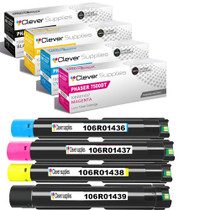
Compatible Xerox 7500DN (106R01439, 106R01436, 106R01437, 106R01438) Toner Cartridge 4 Color Set
- Page Yield:
- Black: 19800, Color: 17800
- Availability:
- In Stock
- Shipping:
- Free Shipping

Amazon Price:

- Page Yield:
- Black: 19800, Color: 17800
- Availability:
- In Stock
- Shipping:
- Free Shipping
- Compatible Printers
- Specifications
- SKU:
- CS-Xerox-PH7500N-PH-7500DN-4Color-Set
- Printer Brand:
- Xerox
- OEM Number:
- 106R01439, 106R01436, 106R01437, 106R01438
- Ink Color:
- Black, Cyan, Magenta, Yellow
- Page Yield:
- Black: 19800, Color: 17800
- Printer Type:
- Laser Cartridge
- Condition:
- New Compatible
- Description
- Reviews

/> 

Deliver vibrant, high-impact prints with the Xerox PHASER 7500N toner cartridge series, including 106R01439 Black, 106R01436 Cyan, 106R01437 Magenta, and 106R01438 Yellow. These compatible Xerox cartridges are engineered to produce sharp black text and vivid, detailed color images for all your professional printing needs. Optimized for performance and reliability, the Xerox PHASER 7500N toner cartridge ensures consistent print quality from the first page to the last. Whether you're printing marketing materials, business presentations, or everyday documents, these cartridges deliver precise color balance and excellent clarity. Compatible with a range of Xerox printers, including PHASER 7500DN, PHASER 7500DT, PHASER 7500DX, and PHASER 7500N, this toner series installs easily and operates seamlessly within your device. Designed to support heavy workloads, they help reduce downtime and improve overall efficiency. Count on the Xerox PHASER 7500N toner cartridge to meet your high-volume printing demands. With impressive page yields and vibrant results, these cartridges are ideal for office environments that require consistent, professional-quality output.
Frequently Asked Questions
Why does a shared office printer argue for a full set instead of single cartridges?
On a networked machine like the 7500DN, nobody owns the toner warning — everyone assumes someone else saw it. A full set on the shelf means the person who finds a slot empty can fix it immediately, whatever color it is. Buying singles one emergency at a time works, but it multiplies deliveries and leaves the printer waiting whenever the dry color is the one nobody stocked.
What exactly is included?
Four cartridges, one for each position: 106R01439 black, 106R01436 cyan, 106R01437 magenta and 106R01438 yellow. That is the machine's entire toner group in one box — when the set arrives, every slot in the printer has its replacement accounted for.
How long should a set last in a typical office?
The ratings give the scale: up to 19,800 pages for the black 106R01439 and up to 17,800 pages for each color, on the standard 5% coverage test page. An office printing a few hundred pages a day, mostly documents with occasional color, will measure a set's life in months. A team producing color handouts daily will cycle the colors sooner — watch the levels the printer reports rather than guessing from the calendar.
Which models take this set?
The Phaser 7500DN heads the list, and the same group serves the Phaser 7500DT, Phaser 7500DX and Phaser 7500N — the suffixes describe trays, duplexing and networking, not different toner. Confirm with the numbers on your installed cartridges: 106R01439, 106R01436, 106R01437, 106R01438.
Does heavy duplex printing change how fast the toner runs out?
No. Duplexing halves paper consumption, not toner consumption — every printed side still takes its full measure of toner. What duplexing does change is the rhythm of the work: long two-sided runs proceed unattended, so a cartridge can reach empty in the middle of a big job. That is one more reason a shared DN keeps its replacement set within arm's reach.
What are the warranty and returns terms?
The set is backed by a 1-year warranty and 1-year free returns; the complete terms are on our shipping and returns page. We ship from the closest stocked warehouse among our IL, PA, GA and CA locations, and support is reachable Monday through Friday, 9 AM to 5 PM CST.
Must all four cartridges in the set be installed at the same time?
No. Install each color only when its slot runs out: the 106R01439 black, 106R01436 cyan, 106R01437 magenta and 106R01438 yellow live independent lives in the machine. Members of the set that are not needed yet stay sealed in the box, which keeps them in the same condition as the day the set arrived.
In what order should the swaps be proven?
One slot at a time, with the printer's color test page printed after each single change. Changing one cartridge and proving it before touching the next means that if a color looks wrong afterward, you know exactly which of the four units caused it — instead of facing four new cartridges and a guessing game.
Which color is likely to run out first from a fresh set?
It follows your documents, not the calendar. Text-heavy offices spend the 19,800-page black 106R01439 first, while a team printing charts and photos leans harder on the 17,800-page colors. Watching which slot the machine flags first after this set teaches you the pattern, so next time a single cartridge can be stocked ahead for that position.
How should the set's four empties be handled over its life?
As each cartridge comes out, it goes into the bag and box of the unit that replaced it, marked with its color. Keeping the four spent units together in the set's carton gives you a complete, tidy bundle to send through a recycling route when the set is finished.
About This Xerox 7500DN 4 Color Set
This listing, at $254.71, is the four-cartridge group titled for the Phaser 7500DN: 106R01439 black rated up to 19,800 pages and 106R01436 cyan, 106R01437 magenta and 106R01438 yellow rated up to 17,800 pages each. It fits offices running the networked, duplexing model as a shared machine that cannot sit idle waiting for a single cartridge to arrive. Singles and larger groupings for the platform are on our Xerox toner page.
Related Items


Xerox
Compatible Xerox 7500N (106R01439, 106R01436, 106R01437, 106R01438) Toner Cartridge 4 Color Set
/>


Xerox
Compatible Xerox 7500DT (106R01439, 106R01436, 106R01437, 106R01438) Toner Cartridge 4 Color Set
/>


Xerox
Compatible Xerox 7500N (106R01439, 106R01436, 106R01437, 106R01438) Toner Cartridge 4 Color Set
/>


Xerox
Compatible Xerox 7500DX (106R01439, 106R01436, 106R01437, 106R01438) Toner Cartridge 4 Color Set
/>