







 See Compatible Printers
 Read more about our ink!
Xerox
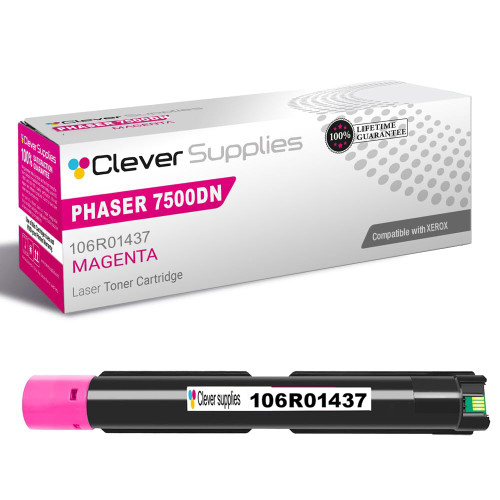
Compatible Xerox 7500DN (106R01437) Toner Cartridge Magenta
- Page Yield:
- Color: 17800
- Availability:
- In Stock
- Shipping:
- Free Shipping

Amazon Price:

- Page Yield:
- Color: 17800
- Availability:
- In Stock
- Shipping:
- Free Shipping
- Compatible Printers
- Specifications
- SKU:
- CS-Xerox-PH7500N-PH-7500DN-M
- Printer Brand:
- Xerox
- OEM Number:
- 106R01437
- Ink Color:
- Magenta
- Page Yield:
- Color: 17800
- Printer Type:
- Laser Cartridge
- Condition:
- New Compatible
- Description
- Reviews

/> 

Deliver vibrant, high-impact prints with the Xerox PHASER 7500N toner cartridge series, including 106R01439 Black, 106R01436 Cyan, 106R01437 Magenta, and 106R01438 Yellow. These compatible Xerox cartridges are engineered to produce sharp black text and vivid, detailed color images for all your professional printing needs. Optimized for performance and reliability, the Xerox PHASER 7500N toner cartridge ensures consistent print quality from the first page to the last. Whether you're printing marketing materials, business presentations, or everyday documents, these cartridges deliver precise color balance and excellent clarity. Compatible with a range of Xerox printers, including PHASER 7500DN, PHASER 7500DT, PHASER 7500DX, and PHASER 7500N, this toner series installs easily and operates seamlessly within your device. Designed to support heavy workloads, they help reduce downtime and improve overall efficiency. Count on the Xerox PHASER 7500N toner cartridge to meet your high-volume printing demands. With impressive page yields and vibrant results, these cartridges are ideal for office environments that require consistent, professional-quality output.
Frequently Asked Questions
Does automatic two-sided printing on the 7500DN use magenta up faster?
Per sheet of paper, yes — but not per printed page. The 17,800-page rating counts printed sides, and a duplexed sheet carries toner on both faces, so a 20-page report folded into 10 sheets still consumes 20 pages of magenta wherever color appears. The DN's habit of printing everything two-sided makes the cartridge counter fall twice as fast as the paper stack shrinks, which catches people out when they estimate life by reams.
Faces in our photos are coming out yellow-green — is magenta to blame?
Very likely. Skin tones are a delicate balance, and magenta is the ingredient that keeps them warm and lifelike. As this cartridge fades, faces drift sallow and greenish while skies and greenery still look acceptable, because those lean on the other colors. Print a page carrying a solid magenta block: if the block is streaky or pale, the cartridge — not your photo file — is the problem.
Is this one cartridge or a multipack?
One. The listing is for a single 106R01437 magenta cartridge at $78.75. The Phaser 7500DN holds its four colors as four separate units, each ordered under its own number; this page sells only the magenta one, rated at 17,800 pages.
Does it fit the other Phaser 7500 versions as well?
Yes — the same cartridge serves the Phaser 7500DN, Phaser 7500DT, Phaser 7500DX and Phaser 7500N. Duplex units, extra trays and finishers change the paper path, never the toner bay, so offices running a mix of 7500 models stock one magenta cartridge for all of them.
How can I check the magenta level without walking to the printer?
The DN is the networked duplex model, and its supplies status can be read from your desk through the printer's built-in web page as well as at the front panel. Treat the percentage as an estimate rather than a promise — heavy color pages burn through the last stretch faster than the gauge implies, so order when it reports low rather than when it reports empty.
What comes with it if something goes wrong?
A one-year warranty backs the cartridge, returns are free within a year, and the complete policy is published on our shipping and returns page. Shipments go out from IL, PA, GA and CA warehouses, support answers Monday to Friday, 9 AM–5 PM CST, and the rest of the 7500 color set is listed on the Xerox toner page.
How do I prove the new magenta with a single page?
Choose a page with a photograph containing faces, printed on the old cartridge before the swap if possible. After installing the 106R01437, print the identical file again and compare skin tones side by side. Warm, natural faces confirm the new cartridge; if the fresh print is still yellow-green, the cause lies somewhere other than magenta.
Why does a photo-heavy desk benefit from keeping this cartridge ahead?
Because magenta rarely announces itself politely — it drifts, and photographs are where drift shows first. Having a sealed 106R01437 on the shelf means the swap happens the day a proof looks wrong, not after a delivery wait during which every photo job prints with the same cast. For a DN working through photo batches, that immediacy protects deadlines.
What mix-up should I guard against when reordering?
The four colors on the 7500 platform carry part numbers that differ only in their final digits, and this magenta is 106R01437. Read the number off the spent cartridge before ordering rather than relying on the color name in a listing title, and the cartridge that arrives will be the one the magenta slot actually needs.
How should the spent magenta cartridge be handled?
Bag and box it in the packaging the new 106R01437 came in, which keeps loose toner sealed away, and keep it until the replacement has settled through a few days of printing. Then send it through a cartridge recycling route instead of the office trash.
About This Phaser 7500DN Magenta Toner Cartridge (106R01437)
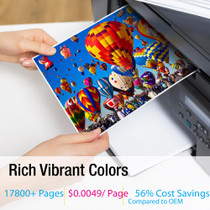
A single high-yield magenta cartridge for the Phaser 7500DN and its sister models, part number 106R01437, rated at 17,800 printed sides and priced at $78.75 — 0.44 cents per rated page. On a duplexing workhorse the magenta does heavy duty in reports, charts and photos, and this high-yield unit is sized to match that workload. It ships with a one-year warranty and free returns for a year.
Related Items

Xerox
Compatible Xerox 7500DX (106R01437) Toner Cartridge Magenta
/>



Xerox
Compatible Xerox 7500N (106R01437) Toner Cartridge Magenta
/>


Xerox
Compatible Xerox 7500N (106R01437) Toner Cartridge Magenta
/>


Xerox
Compatible Xerox 7500DT (106R01437) Toner Cartridge Magenta
/>