







 See Compatible Printers
 Read more about our ink!
Hewlett Packard
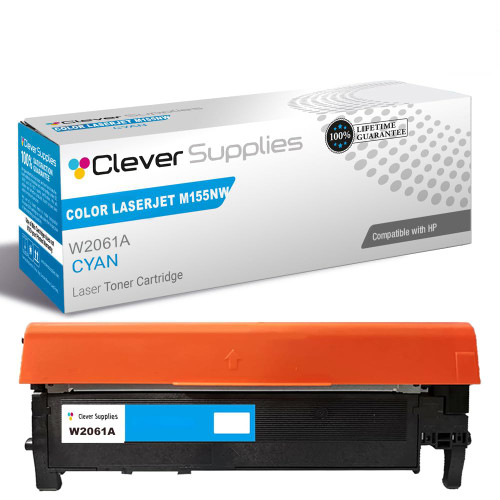
Compatible HP COLOR LASERJET M155NW (W2311A) Toner Cartridge Cyan

Amazon Price:

- Page Yield:
- Color: 850
- Availability:
- In Stock
- Shipping:
- Free Shipping
- Compatible Printers
- Specifications
- SKU:
- CS-HP-215A-CLJ-M155NW-C
- Printer Brand:
- Hewlett Packard
- OEM Number:
- W2311A
- Ink Color:
- Cyan
- Page Yield:
- Color: 850
- Printer Type:
- Laser Cartridge
- Condition:
- New Compatible
- Description
- Reviews



Deliver sharp, vivid prints every time with the HP 215A toner cartridge series, including HP 215A W2310A Black, W2311A Cyan, W2313A Magenta, and W2312A Yellow. Each cartridge is designed to produce crisp black text and rich, vibrant colors for all your everyday printing needs. Optimized for consistent quality, the HP 215A toner cartridge ensures smooth performance and outstanding results from the first page to the last. Whether youre printing business documents or colorful graphics, these cartridges provide dependable clarity and detail. Compatible with COLOR LASERJET M155NW, COLOR LASERJET M182N, COLOR LASERJET M182NW, and COLOR LASERJET M183FW, the HP 215A cartridge series offers seamless integration and reliable operation across all supported printer models. Count on the trusted performance of HP 215A toner cartridge technology to keep your workflow running smoothly. These cartridges are built for easy installation, efficient output, and high-quality results that meet your everyday printing demands.
Frequently Asked Questions
How can I prove it is cyan that is empty, not something else?
Print the supplies status page from the printer's menu — it reports each channel separately. If the cyan bar is at the bottom while black and the other colors hold up, the W2311A is spent; if all bars are healthy, the problem lies elsewhere and no cartridge will fix it. That ten-second report has saved many owners a needless purchase, which is exactly why it is worth printing before the order, not after the parcel arrives. File the report with the invoice when the cartridge does arrive — a month later it is the baseline that shows whether the new cyan is being consumed at a sane rate.
What is the exact part number for this cyan?
W2311A, the HP 215A cyan cartridge. You will find the same code printed on the label of the cartridge currently sitting in the cyan slot.
What yield should I expect from the new one?
The rating is 850 pages on standard documents. Charts and full-color pages draw harder on cyan than letters do, so a graphics desk will see the lower side of that figure.
Will changing cyan disturb the other cartridges?
No. The channels are mechanically independent; removing and replacing the cyan leaves black, magenta and yellow untouched and still counting their own remaining life.
What protection does the purchase carry?
The cartridge is backed by a 1-year warranty, with 1-year free returns if it proves defective. Dispatch is from warehouses in Illinois, Pennsylvania, Georgia and California, and the help desk works Monday through Friday, 9 AM to 5 PM CST.
Anything to do after fitting it?
Print one color test page and check that blues and greens have returned to strength. If they have, the diagnosis is closed and the old cartridge can be recycled.
What is the easiest way to order the wrong cyan?
By one digit. The cyan is W2311A; the magenta beside it is W2313A, and a hurried reorder can transpose them. Read the full code off the label of the cartridge in the cyan slot — or off the supplies page you already printed — and match every character before ordering. The methodical habit that proved the cyan empty is the same one that keeps its replacement correct.
We run two machines from this platform — does one spare cyan cover both?
Yes. Every machine in the family — Color LaserJet M155nw, M182n, M182nw and M183nw — takes this same W2311A, so a single sealed spare on the shelf insures both printers. Fit it where the evidence points first; the other machine's cyan will call for its own cartridge only when its own supplies page shows the bar at the bottom.
Is it worth keeping a log of the supplies pages?
It is the cheapest knowledge this printer offers. Date each supplies page you print and file them in order: across two or three changes they reveal your machine's real cyan appetite — how many weeks a cartridge actually lasts under your mix of charts, photos and letters. That history turns the next reorder from a reaction into a plan, placed while the bar still shows a comfortable margin.
How long should the spent cyan be kept?
Until the new cartridge's first supplies page is filed. The old W2311A is your comparison evidence only until that report exists; after it, the paperwork tells the whole story and the empty can go into its replacement's box and out with the recycling. Keeping it longer adds nothing — a spent cartridge cannot testify better than the dated reports already in the file.
About This W2311A Cyan Toner Cartridge
This compatible 215A cyan, at $67.13, serves color machines in the family of the Color LaserJet M155nw. It is written for the methodical owner — the one who reads the supplies page before spending anything, and wants the single cartridge the evidence points to.
Evidence first, purchase second: if the cyan bar is the empty one, the W2311A is the whole solution, fitted in a minute without tools.
The fit list runs to the whole platform: Color LaserJet M183nw, Color LaserJet M155nw, Color LaserJet M182n and Color LaserJet M182nw — every one of them takes this cartridge. The rest of the family stands beside it: W2310A black cartridge, W2313A magenta cartridge and W2312A yellow cartridge, with the 215A four-color set covering a full refresh.
Related Items

Hewlett Packard
Compatible HP Color LASERJET M182NW (W2311A) Toner Cartridge Cyan


Hewlett Packard
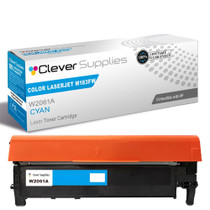
Compatible HP Color LASERJET M183FW (W2311A) Toner Cartridge Cyan

Hewlett Packard
Compatible HP Color LASERJET M182N (W2311A) Toner Cartridge Cyan


Hewlett Packard
Compatible HP COLOR LASERJET M155NW (W2310A, W2311A, W2313A, W2312A) Toner Cartridge 4 Color Set