







 See Compatible Printers
 Read more about our ink!
Hewlett Packard
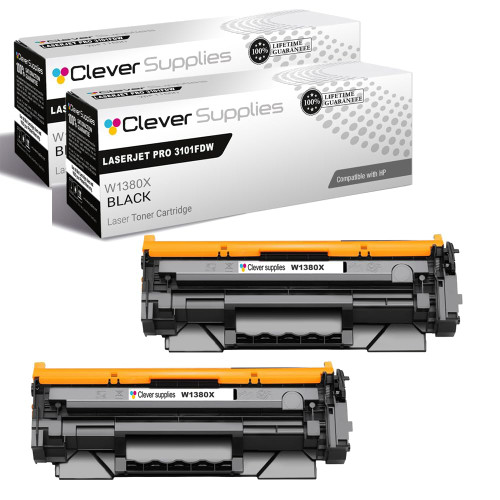
Compatible HP 138X (W1380X) Toner Cartridge 2 Black
- Page Yield:
- Black: 4000
- Availability:
- In Stock
- Shipping:
- Free Shipping

Amazon Price:

- Page Yield:
- Black: 4000
- Availability:
- In Stock
- Shipping:
- Free Shipping
- Compatible Printers
- Specifications
- SKU:
- CS-HP-138X-LASERJET-PRO-3101FDW-2BK
- Printer Brand:
- Hewlett Packard
- OEM Number:
- W1380X
- Ink Color:
- Black
- Page Yield:
- Black: 4000
- Printer Type:
- Laser Cartridge
- Condition:
- New Compatible
- Description
- Reviews



Maximize print efficiency with the HP 138X toner cartridge, featuring the HP 138X W1380X BLACK. This high-yield cartridge delivers sharp black text and superior print quality, making it ideal for high-volume printing environments. Designed for reliability, the HP 138X toner cartridge provides consistent results from the first page to the last. Whether you're printing detailed reports or everyday business documents, it ensures clean, professional output with every job. Compatible with LASERJET PRO 3001DW, LASERJET PRO 3002DW, LASERJET PRO 3101FDW, and LASERJET PRO 3102FDW, this toner cartridge integrates seamlessly with your HP printer. Its simple installation process helps minimize downtime and keeps workflows running smoothly. Count on the HP 138X toner cartridge for exceptional performance, extended yield, and outstanding print quality. Its the perfect choice for offices that demand speed, reliability, and consistent results.
Frequently Asked Questions
How does a two-pack fit a school office's year?
Neatly, because school printing comes in waves — enrollment packs, reports, exam papers, end-of-term letters. This box holds two W1380X black cartridges, each rated at 9,200 pages, so one can carry a heavy term while the second waits sealed for the next surge. Ordering once for two changeovers also means one purchase order, not two.
What should we check on the old cartridge before ordering?
Its label. W1380X marks the high-yield black supply for the LaserJet Pro 3001dw platform — the LaserJet Pro 3001dw and MFP 3101 machines. If the spent unit shows that code, this pair is the correct stock for the cupboard. The supplies status page printed from the machine itself repeats the code if the old cartridge has already gone.
The spare may sit through a whole summer holiday. Will it still print well?
Yes. A sealed toner cartridge does not dry out over a break — the powder inside is stable, and the drum is protected within the unit. Store the box in a normal indoor cupboard rather than a hot plant room, and rock the cartridge gently before fitting so the powder settles evenly.
Our printer is shared by the whole office team. Any fitting advice?
Make the swap a known routine: cover up, old unit out, seal off the new one, slide it in until it clicks, one test page. Because the imaging drum is built into the W1380X, the change also clears drum-wear symptoms like ghosting. Anyone on the team can do it in minutes, so the job never waits for one particular person.
What does $81.89 get the school?
Two complete, sealed high-yield black cartridges — not a refill and not a single oversized unit. Each is ready to fit as it comes out of the box. The pair belongs to our HP toner cartridges range, chosen by offices that stock ahead for the term.
What warranty and returns cover applies?
A 1-year warranty and 1-year free returns cover the cartridges, with the process set out on our shipping and returns page. Orders are sent from warehouses in Illinois, Pennsylvania, Georgia, California, and support runs Monday through Friday, 9 AM to 5 PM CST.
Two machines draw on this stock. Will both cartridges run out around the same time?
Almost never. Cartridges empty by pages printed, not by the calendar, so the busier of your LaserJet Pro machines will call for its W1380X first while the quieter one keeps going. The supplies status page on each machine shows where its cartridge stands, and a quick check at the start of a heavy term tells you which of the pair will be needed where.
What does each cartridge in the pair work out to cost?
The two-pack is $81.89, so each W1380X effectively costs about $40.95. Spread across the combined rating of 18,400 pages, that is under half a cent per page at standard coverage. Dense school documents such as exam papers and worksheet packs cover more of the page and will push the real figure up somewhat, but the pair remains an inexpensive way to cover a long stretch of printing.
After a mid-term swap, how do we check the new cartridge is printing properly?
Print a document the office knows well — a standard letter or a page of the usual report format — before the cartridge is trusted with a big run. The text should be deep and even across the page, matching how that same document looked when the previous cartridge was healthy. If it does, the swap is proven in a minute and the machine can go straight back into service.
Where do the empty cartridges go during the school year?
Back into the box the replacements came in, at first. Keep each spent W1380X until its successor has printed cleanly for a few days, so there is something to point to if a fault is reported later. Once both are confirmed spent and their replacements proven, the empties can leave together through the school's normal recycling or waste route instead of accumulating one by one in cupboard corners.
About This HP 138X Two-Pack
This compatible HP 138X (W1380X) two-pack matches a printing calendar with surges and quiet spells. Two long-yield cartridges carry school printing through successive peaks, the sealed spare ignores the holidays in between, and reordering only comes up once both are used up.
It is built for the LaserJet Pro 3001dw and LaserJet Pro 3002dw on the printer side and the LaserJet Pro 3101fdw and LaserJet Pro 3102fdw on the multifunction side. The same fit comes in a standard-yield 138A (W1380A) two-pack — 2,600 pages a cartridge, suited to lighter use. A 138X (W1380X) single cartridge is listed as well for one-off replacements.
Related Items


Hewlett Packard
Compatible HP 138X (W1380X) Toner Cartridge Black



Hewlett Packard
Compatible HP 138X (W1380X) Toner Cartridge 2 Black


Hewlett Packard
Compatible HP 138X (W1380X) Toner Cartridge 2 Black


Hewlett Packard
Compatible HP 138X (W1380X) Toner Cartridge Black