







 See Compatible Printers
 Read more about our ink!
Hewlett Packard
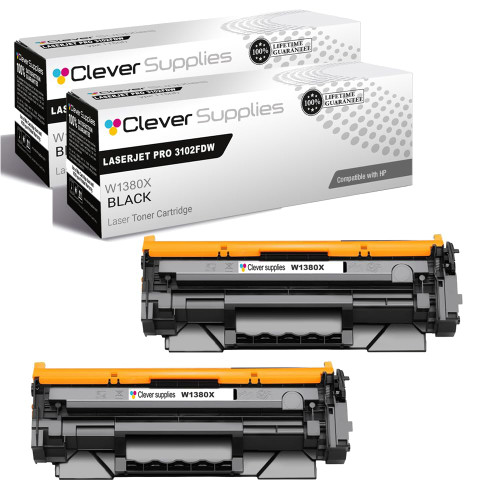
Compatible HP 138X (W1380X) Toner Cartridge 2 Black
- Page Yield:
- Black: 4000
- Availability:
- In Stock
- Shipping:
- Free Shipping

Amazon Price:

- Page Yield:
- Black: 4000
- Availability:
- In Stock
- Shipping:
- Free Shipping
- Compatible Printers
- Specifications
- SKU:
- CS-HP-138X-LASERJET-PRO-3102FDW-2BK
- Printer Brand:
- Hewlett Packard
- OEM Number:
- W1380X
- Ink Color:
- Black
- Page Yield:
- Black: 4000
- Printer Type:
- Laser Cartridge
- Condition:
- New Compatible
- Description
- Reviews



Maximize print efficiency with the HP 138X toner cartridge, featuring the HP 138X W1380X BLACK. This high-yield cartridge delivers sharp black text and superior print quality, making it ideal for high-volume printing environments. Designed for reliability, the HP 138X toner cartridge provides consistent results from the first page to the last. Whether you're printing detailed reports or everyday business documents, it ensures clean, professional output with every job. Compatible with LASERJET PRO 3001DW, LASERJET PRO 3002DW, LASERJET PRO 3101FDW, and LASERJET PRO 3102FDW, this toner cartridge integrates seamlessly with your HP printer. Its simple installation process helps minimize downtime and keeps workflows running smoothly. Count on the HP 138X toner cartridge for exceptional performance, extended yield, and outstanding print quality. Its the perfect choice for offices that demand speed, reliability, and consistent results.
Frequently Asked Questions
Our dispatch labels started printing gray and barcodes will not scan. Will a fresh cartridge fix it?
Very likely. Scanners need strong contrast, and a cartridge near the end of its life lays down thinner toner, turning black bars gray. Labels are dense print, so they drain a cartridge faster than letters do. Fitting a fresh W1380X — new imaging drum as well as toner — restores the deep, even black scanners read first time.
What is in the box for $81.89?
Two complete black cartridges, each a W1380X unit rated at 9,200 pages and sealed ready to fit. One goes into the printer now; the other stays on the shelf as the instant replacement. They are full cartridges with built-in drums, not refill bottles, and they are stocked in our HP toner cartridges range for the LaserJet Pro 3001dw platform.
How do we check this is our cartridge before opening the box?
Compare codes. The outgoing cartridge's label should read W1380X — the high-yield black supply for machines like the LaserJet Pro 3001dw and the MFP 3101 models. Do not rely on looks; cartridges for different platforms can appear similar while being entirely different supplies.
Can the spare live on a warehouse shelf?
Yes, with ordinary sense: sealed, flat, away from steamy dock doors, direct sun, or a heater it might sit against all winter. Toner powder does not dry out, so shelf time does not shorten the cartridge's working life. A gentle rock before fitting evens out settled powder.
How long might the pair last a dispatch desk?
Each cartridge is rated at 9,200 pages at standard five percent coverage. Shipping labels cover far more of the page than office letters, so count on noticeably fewer pages in real use — but the pair still represents many months of labels for a typical small dispatch operation.
What happens if a cartridge underperforms?
A 1-year warranty and 1-year free returns stand behind each unit, with the details on our shipping and returns page. Stock ships from warehouses in Illinois, Pennsylvania, Georgia, California, and support is available Monday through Friday, 9 AM to 5 PM CST.
What does this pair cost per cartridge, and per rated page?
The two-pack is $81.89, so each W1380X works out to about $40.95. Across the pair's combined rating of 18,400 pages that is under half a cent per page at standard coverage. Dispatch labels cover far more of the page than that standard assumes, so the honest per-label figure will be higher — but the comparison still shows the pair is a modest cost for months of scannable output.
After fitting a fresh cartridge, how do we confirm the barcode problem is actually gone?
Print a short run of real labels and scan several of them, not just the first. A sound W1380X lays down deep, even black, so the bars should read first time on every label, including the last one off the run. Testing with the actual label stock and the actual scanner closes the question in minutes, before a full dispatch batch depends on the answer.
We run two printers from this platform. Can the pair be split between them?
Yes. Both cartridges are the identical W1380X, so one can go into each machine rather than one serving as a shelf spare for a single printer. That arrangement suits desks where two machines share the label work. The reorder cue then becomes simple: when the second cartridge is fitted, the shelf is empty and the next pair should be ordered.
How should spent label-printer cartridges be handled?
Keep each empty until its replacement has passed the scan test on real labels. Put the spent W1380X back in its box beside the printer; that preserves your evidence if a print-quality question comes up later. Once the fresh cartridge is scanning cleanly, the empty can leave with the operation's normal recycling or waste for cartridges, rather than drifting around the packing bench.
About This HP 138X Label-Printer Pair
This compatible HP 138X (W1380X) two-pack is aimed at desks where print quality is measured by a scanner, not by eye. Deep black output keeps barcodes readable, the built-in drum keeps that density even, and keeping the second cartridge on the shelf means a fading run of labels never turns into a dispatch delay.
Compatibility covers the LaserJet Pro 3001dw and LaserJet Pro 3002dw printers plus the LaserJet Pro 3101fdw and LaserJet Pro 3102fdw multifunction models — the complete list for this code. If your printing is occasional, the standard 138A (W1380A) two-pack fits the same machines and is rated at 2,600 pages. A 138X (W1380X) single cartridge is listed as well for one-off replacements.
Related Items


Hewlett Packard
Compatible HP 138X (W1380X) Toner Cartridge Black



Hewlett Packard
Compatible HP 138X (W1380X) Toner Cartridge 2 Black


Hewlett Packard
Compatible HP 138X (W1380X) Toner Cartridge Black

Hewlett Packard
Compatible HP 138X (W1380X) Toner Cartridge 2 Black