







 See Compatible Printers
 Read more about our ink!
Hewlett Packard
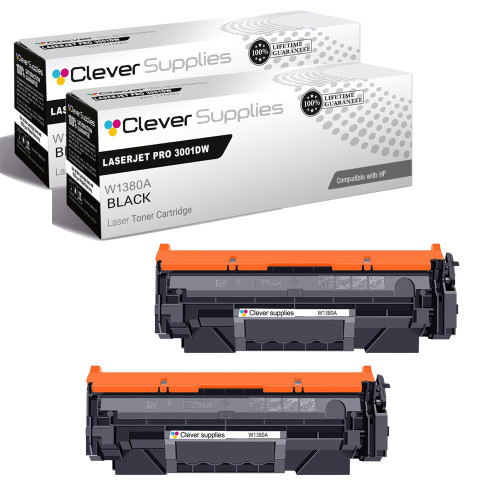
Compatible HP 138A (W1380A) Toner Cartridge 2 Black
- Page Yield:
- Black: 1500
- Availability:
- In Stock
- Shipping:
- Free Shipping

Amazon Price:

- Page Yield:
- Black: 1500
- Availability:
- In Stock
- Shipping:
- Free Shipping
- Compatible Printers
- Specifications
- SKU:
- CS-HP-138A-LASERJET-PRO-3001DW-2BK
- Printer Brand:
- Hewlett Packard
- OEM Number:
- W1380A
- Ink Color:
- Black
- Page Yield:
- Black: 1500
- Printer Type:
- Laser Cartridge
- Condition:
- New Compatible
- Description
- Reviews



Print with precision using the HP 138A toner cartridge, featuring the HP 138A W1380A BLACK. This compatible HP cartridge is engineered to produce crisp black text and consistent quality across all types of documents. Built for everyday performance, the HP 138A toner cartridge ensures reliable operation and excellent print clarity from the first page to the last. Whether you're printing invoices, reports, or internal communications, this cartridge provides clean and professional results. Compatible with LASERJET PRO 3001DW, LASERJET PRO 3002DW, LASERJET PRO 3101FDW, and LASERJET PRO 3102FDW, this toner installs easily and integrates seamlessly with your HP device for uninterrupted productivity. Depend on the quality and consistency of the HP 138A toner cartridge to meet your daily printing needs. With trusted HP performance and sharp output, this cartridge is an ideal choice for efficient home and office printing.
Frequently Asked Questions
Our statements all print in one week each month. Is a 2-pack the right shape?
It suits that rhythm well. Each W1380A cartridge is rated at 2,600 pages, so a pair covers a heavy statement week with the second cartridge as the mid-run reserve. When the run ends, whatever remains stays sealed and ready for next month.
How do I make sure I am reordering the right supply?
Check the stamp on the cartridge you remove: W1380A, the HP 138A. Printers like the LaserJet Pro 3001dw use this single black supply for everything — letters, statements, labels. Match the stamp and the order is right.
Halfway through the run, pages started coming out light. What now?
Rock the installed cartridge side to side and continue. If density recovers only briefly, swap in the second cartridge from this pack and finish the run at full quality — a statement run is no place for fading account numbers. The tired cartridge can print internal drafts afterwards if anything remains in it.
Can I install the second cartridge in a second printer instead?
Of course. The two cartridges are independent and identical. Many property offices put one in the front-office printer and one in the back-office machine, then reorder the pair when both run low together. One order restocks both machines, which keeps the supply cupboard simple to manage.
What does the pack cost, all in?
$70.99 buys both cartridges. There is no per-cartridge surcharge for the pack format and no separate drum to factor in — on this platform the drum is part of the cartridge and renews with every swap.
What happens if a cartridge fails during statement week?
You are covered by a 1-year warranty and 1-year free returns — the steps are on our shipping and returns page. Parcels ship from Illinois, Pennsylvania, Georgia, California, and our support team works Monday through Friday, 9 AM to 5 PM CST.
How can I check the reserve situation before statement week begins?
Print a supplies status page or open the printer's status screen a few days ahead and read the installed W1380A's estimated percentage. If it sits low going into the run, fit the pack's second cartridge before the statements start rather than mid-batch — the tired unit can still serve for internal drafts afterward, and the run begins on a cartridge with known life.
Our statements carry logos and shaded tables. How does that change the pair's math?
Each cartridge's 2,600-page rating assumes light text coverage. A statement page with a logo band, shaded summary boxes and ruled tables covers far more of the sheet, so the same cartridge yields fewer finished statements than the headline figure suggests. Planning the run on a conservative per-cartridge count — with the second W1380A as the reserve — absorbs that difference without a mid-week scramble.
Where should the second cartridge live during the month?
Close to the printer that runs the statements, sealed in its box, flat and away from heat. A spare stored across the building tends to be fetched only after fading has already reached client-facing pages; a spare in the same cabinet gets fitted the moment density dips. Wherever it waits, keep it in its packaging so the W1380A stays clean and ready.
What happens to the cartridge that finishes during the run?
Once the fresh cartridge is in and the statements are printing at full density, bag the spent W1380A in the new one's packaging and set it aside for recycling. If you swapped early and the old unit still shows life on drafts, mark it clearly as the draft cartridge so nobody refits it for client documents by mistake during the next run.
About This 138A 2-Pack for Month-End Runs
Statement week punishes offices that run their toner to the last page. This compatible HP 138A 2-pack, listed among the HP toner cartridges at Clever Supplies, keeps a reserve cartridge beside the printer your accounts run on, so month-end never waits on a delivery.
This supply drops into the LaserJet Pro 3001dw, the LaserJet Pro 3002dw, the LaserJet Pro 3101fdw and the LaserJet Pro 3102fdw; that is the entire printer list for the code. There is a high-yield twin as well: the 138X (W1380X) two-pack stretches the rating to 9,200 pages for busier desks. A 138A (W1380A) single cartridge is listed as well for one-off replacements.
Related Items


Hewlett Packard
Compatible HP 138A (W1380A) Toner Cartridge 2 Black



Hewlett Packard
Compatible HP 138A (W1380A) Toner Cartridge 2 Black


Hewlett Packard
Compatible HP 138A (W1380A) Toner Cartridge 2 Black

Hewlett Packard
Compatible HP 138A (W1380A) Toner Cartridge 2 Black