




ImageClass MF429dw
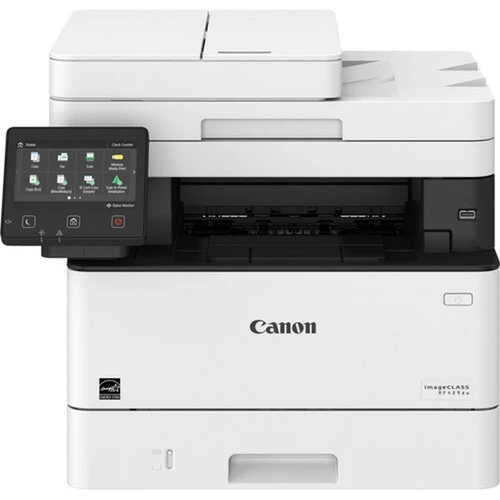
One-touch workflows define the imageCLASS MF429dw: Canon’s Application Library lets a team park its routine jobs behind single buttons on the color touchscreen of this 40-page-per-minute monochrome multifunction. Print, copy, scan and fax are all included, with automatic duplexing throughout. It feeds on the Canon 052 cartridge, rated for 3,100 pages, and accepts the high-yield Canon 052H, roughly 9,200 pages, for offices whose one-touch buttons get pressed all day long.
Every office has the same five jobs done two hundred times a year: scan this to the shared folder, copy that form double-sided, fax the signed page to the same number. On most machines each one is a small expedition through menus; the Application Library turns them into labeled buttons, so the newest hire does them exactly like the person who set them up. That consistency is the MF429dw’s real product — a departmental multifunction that behaves identically for everyone who walks up to it, at full 40-ppm speed.
/compatible-canon-051h-toner-cartridge-black-2-pack/Toner Cartridges for ImageClass MF429dw| Cartridge | Color | Page Yield |
|---|---|---|
| Canon 052 Toner Cartridge — Black | Black | 3,100 pages |
| Canon 052 Toner Cartridge — Black, 2 Pack | Black | 3,100 pages per cartridge |
| Canon 052 Toner Cartridge — Black, 4 Pack | Black | 3,100 pages per cartridge |
| Canon 052H Toner Cartridge — Black | Black | 9,200 pages |
| Canon 052H Toner Cartridge — Black, 2 Pack | Black | 9,200 pages per cartridge |
| Canon 052H Toner Cartridge — Black, 4 Pack | Black | 9,200 pages per cartridge |
| Canon 052 Toner Cartridge — Black (alternate listing) | Black | 3,100 pages |
| Canon 052 Toner Cartridge — Black, 2 Pack (alternate listing) | Black | 3,100 pages per cartridge |
| Canon 052 Toner Cartridge — Black, 4 Pack (alternate listing) | Black | 3,100 pages per cartridge |
| Canon 052H Toner Cartridge — Black (alternate listing) | Black | 9,200 pages |
| Canon 052H Toner Cartridge — Black, 2 Pack (alternate listing) | Black | 9,200 pages per cartridge |
| Canon 052H Toner Cartridge — Black, 4 Pack (alternate listing) | Black | 9,200 pages per cartridge |
Preset buttons quietly raise volume: when copying a standard form takes one tap, people copy more of them, and received faxes add their share on top. Plan the cartridge for that reality. The standard Canon 052, at 3,100 pages, suits a small team with moderate habits; a department that lives on its one-touch routines should standardize on the 052H instead, whose roughly 9,200 pages cut the swap frequency to about a third and lower the cost of every page. A 4 pack of either yield, kept in the cabinet beside the machine, is the difference between a two-minute swap and a two-day wait.
/compatible-canon-051h-toner-cartridge-black-2-pack/Chip, toner and everyday useBecause this machine serves people who did not choose it and will not nurse it, the toner warning deserves a process: whoever sees the low-toner notice first swaps in the shelf spare — a one-minute job — and the empty goes on the reorder list the same day. The panel reads the level from the cartridge chip, so the warning arrives with enough pages left to finish the day comfortably; fading prints, by contrast, mean the end is already here. A gentle rock of the cartridge side to side can rescue a fading run, and spares store best sealed, flat and away from radiators or sunny windowsills.
/compatible-canon-051h-toner-cartridge-black-2-pack/Frequently Asked QuestionsWhat is the Application Library?
It is Canon’s system of customizable one-touch buttons on the touchscreen: routine combinations — a specific copy setup, a scan destination, a regular fax number — are saved once and afterwards run with a single press, the same way for every user.
What toner does the MF429dw use?
The Canon 052 black cartridge, rated for 3,100 pages, or the high-yield Canon 052H at around 9,200 pages in the same bay. Both yields are listed above as singles and in 2 and 4 packs under two listings.
Does the fax use the same cartridge?
Yes. Received faxes print on paper through the same Canon 052-family cartridge as prints and copies, while sending a fax from the feeder uses no toner at all.
How do I swap in a fresh 052?
Open the front cover, lift the old cartridge out by its handle, and unpack the replacement. Rock it slowly side to side a few times, remove any protective material, slide it in until it clicks into place, and close the cover — the panel will confirm the new level.
/compatible-canon-051h-toner-cartridge-black-2-pack/More printers that use the same cartridgesEvery other model on this cartridge family — the print-only ImageClass LBP214dw and ImageClass LBP215dw, and the multifunction ImageClass MF424dw and ImageClass MF426dw — runs on the same cartridges listed above.