




Canon 131
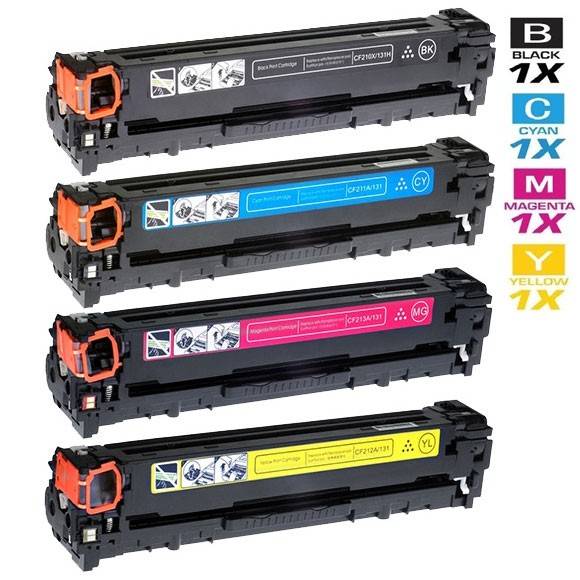
The Canon 131 family is the four-cartridge color set for Canon's smaller color laser machines — the imageCLASS LBP7110 printers and the MF8280, MF624 and MF628 color multifunction models listed below. Black comes in two capacities: the standard 131 black (6272B001AA) and the high-yield 131H black (6273B001AA). The colors are sold as singles — cyan (6271B001AA), magenta (6270B001AA) and yellow (6269B001AA) — or together with a black in the 4-color set in the table below.
Color machines in small offices lead a double life. Most days they are document printers that happen to be color-capable, grinding through black text while the color cartridges wait; then a proposal, a menu or a set of charts lands and all four cartridges work at once. The practical consequence is that the four cartridges almost never run out together — black goes first, then whichever color the office's work leans on — and the 131 family is built for that pattern. Each cartridge is its own sealed unit that can be changed on its own, in about a minute, without touching the others, and the part numbers make it easy to order exactly the one the machine is asking for.
Canon 131 Toner Cartridges
| Cartridge | Color | Page Yield |
|---|---|---|
| Compatible Canon 131 (6272B001AA) Toner Cartridge Black | Black | See product page |
| Compatible Canon 131H (6273B001AA) Toner Cartridge High Yield Black | Black | See product page |
| Compatible Canon 131 (6271B001AA) Toner Cartridge Cyan | Cyan | See product page |
| Compatible Canon 131 (6270B001AA) Toner Cartridge Magenta | Magenta | See product page |
| Compatible Canon 131 (6269B001AA) Toner Cartridge Yellow | Yellow | See product page |
| Compatible Canon 131H & 131 Toner Cartridges 4 Color Set (6273B001AA/ 6271B001AA/ 6270B001AA/ 6269B001AA) | Black | See product page |
| Compatible Canon 131H & 131 Premium Quality Toner Cartridges 4 Color Set (6273B001AA/ 6271B001AA/ 6270B001AA/ 6269B001AA) | Black | See product page |
Which cartridge should you buy?
Buy the cartridge the machine names — in a color set, replacing one cartridge at a time is both the cheapest and the correct approach, and there is no benefit to changing colors that still have toner. For black, choose between the two capacities: the standard 131 black suits a machine whose color work is occasional and whose black printing is light, while the high-yield 131H black earns its keep in any office printing documents daily, because black is consumed on nearly every page and the H build stretches the interval between changes. The 4-color set is the right purchase at two moments: when a machine is being set up or refreshed and several cartridges are low together, and as a shelf spare for an office that cannot afford a stopped color printer. The premium-quality set in the table is the same combination in the store's premium-quality build. Keep colors as singles on the shelf and black as the spare you reorder most — that mirrors how the machine actually consumes them.
Chip, toner and everyday use
Each 131 cartridge drops into its own color-coded slot, and the machine will not accept a cartridge in the wrong slot, so a change is hard to get wrong. Take the new cartridge out of its bag, rock it gently five or six times end to end, pull the seal, and slide it home until it clicks; then repeat only for any other color the machine has flagged. If a replaced color looks weak on its first pages, the machine's own calibration routine, found in its maintenance menu, evens the density out — run it rather than reseating cartridges repeatedly. Judge a low-color warning by the pages you print, not the calendar: a cartridge flagged at low can still print many text pages, because ratings assume roughly 5% coverage and a color can be nearly untouched by black-heavy work. Store spare color cartridges sealed, upright and out of sunlight until they are needed.
Printers that use the Canon 131
The Canon 131 family fits these color imageCLASS printers: ImageClass MF8280, ImageClass MF8280C, ImageClass MF8280CW, ImageClass LBP7110, ImageClass LBP7110CW, ImageClass MF624CW, ImageClass MF628CW, ImageClass MF624, ImageClass MF628, ImageClass Color MF8280CW.
Frequently Asked Questions
What is the difference between the Canon 131 and the 131H?
They are the two black cartridges for this family. The standard black is the 131, part number 6272B001AA; the 131H, part number 6273B001AA, is the high-yield build of the same cartridge, with a larger fill that lasts longer. The colors — cyan, magenta and yellow — come in one capacity each and are shared by both black options.
Only my yellow cartridge is empty. Do I have to buy the whole set?
No. The yellow cartridge, 6269B001AA, is sold on its own on this page, and changing just the yellow leaves the other three cartridges untouched in the machine. The 4-color set only makes sense when several cartridges are running low at the same time.
Can I put the 131H black in an imageCLASS MF628Cw?
Yes. The MF628Cw and the other printers in the family list below accept both black cartridges in this family — the standard 131 black and the high-yield 131H. Choosing between them is a matter of how much the machine prints, not of fitting.
How do I know which part number my machine is asking for?
The machine's toner screen names the color, and each color has one part number: black is 6272B001AA (or 6273B001AA for the high-yield), cyan is 6271B001AA, magenta is 6270B001AA and yellow is 6269B001AA. Match the color on the screen to the number here and you have the right cartridge.