





 See Compatible Printers
 Read more about our ink!
Brother
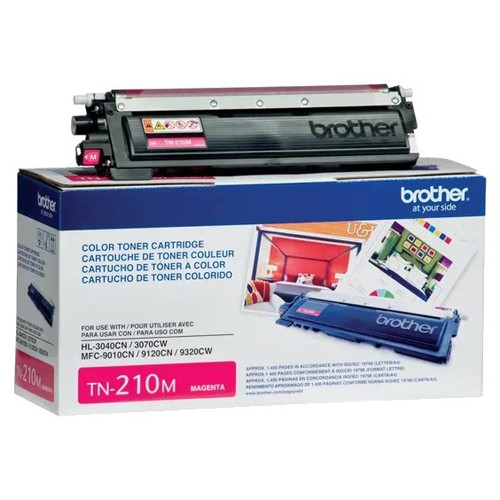
Brother TN210M Magenta Genuine OEM Toner Cartridge - 1,400 pages

Amazon Price:

- Page Yield:
- 1,400 Pages
- Availability:
- In Stock
- Shipping:
- Free Shipping
- Compatible Printers
- Specifications
- SKU:
- CS-Bro-OEM-Tn-210-M
- Printer Brand:
- Brother
- OEM Number:
- TN210M
- Ink Color:
- Magenta
- Page Yield:
- 1,400 Pages
- Printer Type:
- Laser Cartridge
- Condition:
- New
- Description
- Reviews

/> 

OEM Brother TN210M magenta laser toner cartridge is professionally designed to produce the highest quality printouts for your Brother laser printer. The brand new TN210M is an ideal choice laser toner cartridge for your Brother printer. Brother laser toners deliver excellent, dependable results, page after page. You can depend on Brother TN210M toner cartridges.Work with HL-3040CN, HL-3045CN, HL-3070CW, HL-3075CW, MFC-9010CN, MFC-9120CN, MFC-9125CN, MFC-9320CW, MFC-9325CW
Frequently Asked Questions
Our company red is printing orange — is the magenta to blame?
Very likely. A true red is built from magenta and yellow together; when the magenta runs low, the mixture tips toward yellow and reds slide orange, while purples thin out and skin tones turn sallow. Check the TN210M's gauge first — that orange drift is the classic low-magenta signature on this platform. A fresh cartridge restores the red immediately; if the gauge reads full, the yellow over-delivering would be the next suspect, but it is rarely the first.
What is the TN210M rated at, and what does that mean in practice?
1,400 pages at the standard test coverage, shared with the cyan and yellow in this family. In a mixed office the rating stretches: most documents spend magenta only on logos, charts and accents, so a cartridge can serve for months. Photo printing and full-color marketing pieces are the heavy draw — a run of brochures can move the gauge visibly in a week. Order by the gauge, and treat the rating as the yardstick it is rather than a promise.
Which printers use the TN210M?
The eleven TN210-platform models: DCP-9010CN; HL-3040CN, HL-3045CN, HL-3070CW and HL-3075CW; and MFC-9010CN, MFC-9120CN, MFC-9125CN, MFC-9320CN, MFC-9320CW and MFC-9325CW. The magenta sits in the drum tray between the TN210C and TN210Y, with the TN210BK black alongside — four separate cartridges, four separate gauges, each changeable alone.
What does magenta cost per page on this platform?
Approximately 7.7 cents of rated capacity — $107.45 divided by 1,400 pages, identically priced with the cyan and yellow. A color page typically draws on more than one cartridge, so read the figure as magenta's share of a color page's cost rather than the whole. Our price is well under the $150.43 list, and the per-page number above is calculated on what you actually pay.
Is it worth holding a spare magenta if we print our own marketing?
Yes — brand colors are unforgiving, and they fail mid-run, not between jobs. A brochure batch stopped by an empty TN210M costs more in delay than the cartridge costs on the shelf. Sealed, flat, indoors and away from heat, a genuine spare keeps indefinitely for practical purposes. Offices printing mostly internal documents can skip the spare and simply reorder on the low warning.
What cover comes with this cartridge?
Brother's manufacturer warranty, as with all genuine Brother stock, plus our own return terms: 30 days from delivery in all cases — the full wording lives on our shipping and returns page. We hold stock in Illinois, Pennsylvania, Georgia and California and ship from the nearest; if anything arrives wrong, support is on hand Monday to Friday, 9 AM to 5 PM CST.
How can I confirm a new magenta has fixed our red?
Reprint the piece that exposed the problem — the page with your company red on it — once the TN210M is in. Judge the third or fourth copy rather than the first, and compare it against a sample you kept from when the color was right. A genuine cartridge restores the red in one swap, so if orange persists beyond those first pages, the yellow becomes the suspect.
Do color copies on the MFC models use this cartridge too?
Yes. On the MFC-9010CN, MFC-9320CW and the other multifunction models in this family, a color copy draws on the TN210M exactly as a printed page does — reds and purples in copied charts and handouts come out of the same 1,400 pages. An office that copies in color will move the magenta gauge faster than its print volume alone suggests.
What is worth checking when the cartridge is delivered?
That the seal is intact and the code reads TN210M — the magenta sits between cyan and yellow in a look-alike row of genuine boxes, and the last letter is the only reliable distinction. Checking on arrival matters because returns on genuine Brother stock run 30 days from delivery in all cases; a mix-up caught then is a straightforward exchange.
Can I coax a fading magenta through one last brochure run?
Briefly, yes. Remove the TN210M and rock it gently from side to side; the toner redistributes and even coverage usually returns for a limited run — enough to finish the job in hand. It is borrowed time rather than new life, so order the replacement the same day and run only what matters on the stretched cartridge.
About This Genuine Brother TN210M Magenta Toner Cartridge
The genuine magenta for Brother's compact TN210 color platform — 1,400 rated pages at $107.45, against a $150.43 list. It is the cartridge your reds, purples and skin tones are built from on the DCP-9010, HL-3040 and MFC-9320 generation. The rest of the family — black, cyan and yellow — is stocked in the Brother range at Clever Supplies.
Related Items
Brother
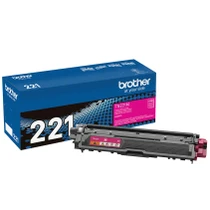
Brother TN221M Magenta Genuine OEM Toner Cartridge - 1,400 pages


Brother
Brother TN210C TN210M TN210Y Cyan Magenta Yellow Genuine OEM Toner Cartridge 3 Color Set - 1,400 pages each
/>
Brother
Brother TN210C Cyan Genuine OEM Toner Cartridge - 1,400 pages
/>
Brother
Brother TN210Y Yellow Genuine OEM Toner Cartridge - 1,400 pages
/>