





 See Compatible Printers
 Read more about our ink!
Brother
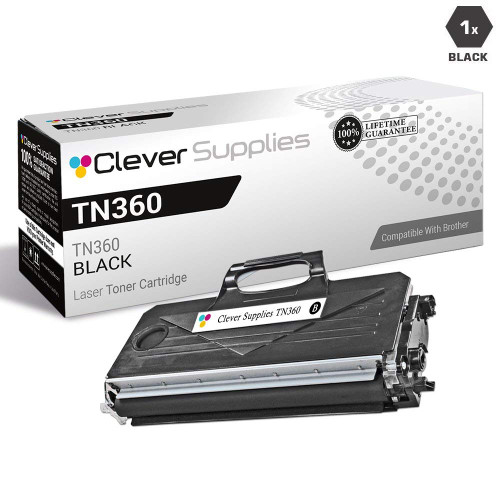
Compatible Brother MFC-7840W Toner Cartridge
- Page Yield:
- 2600
- Availability:
- In Stock
- Shipping:
- Calculated at Checkout

Amazon Price:

- Page Yield:
- 2600
- Availability:
- In Stock
- Shipping:
- Calculated at Checkout
- Compatible Printers
- Specifications
- SKU:
- MFC-7840W
- Printer Brand:
- Brother
- OEM Number:
- TN330, TN360
- Ink Color:
- Black
- Page Yield:
- 2600
- Printer Type:
- Laser Cartridge
- Condition:
- New Compatible
- Description
- Reviews

/> 

On the Brother MFC-7840W (an all-in-one laser machine), the longest-running cartridge in the TN330/TN360 family is this 2,600-page high-yield compatible. Against the 1,500-page standard TN330 from the same family, the high-yield rating stretches each cartridge's working life.
A 1-year warranty covers the cartridge, and returns are free for a full year.
Frequently Asked Questions
If I swap the cartridge in my wireless MFC-7840W, will its network and scan settings survive?
Yes, untouched — that is the reassurance this machine's owners most often want. The W in MFC-7840W stands for wireless, and its network configuration and scan settings are stored in the printer, not in the toner. Fit this TN360-class cartridge, rated at 2,600 pages for $31.33 (about 1.21¢ a page), and everything wireless about the MFC-7840W stays exactly as you set it up.
Why does a wireless all-in-one like the MFC-7840W benefit especially from a 2,600-page cartridge?
Because a wireless MFC-7840W gathers work from everywhere — prints from laptops in other rooms, copies at the machine, scans sent onward — and its true page count creeps up unseen. A high-yield cartridge gives that scattered workload a longer leash, so the machine you rarely stand next to is also the machine you rarely have to rescue. For the full picture on this cartridge family, see our Best Brother TN330 Toner Cartridges guide: the TN330 and TN360 listings are priced as one shared cartridge, and the guide sets both names side by side with the DR360 drum — including how the two names differ on paper and where they turn out to be the same cartridge underneath.
My MFC-7840W has always used TN330 cartridges — can it take this TN360 instead?
It can. The MFC-7840W accepts the standard TN330 at 1,500 pages and this high-yield TN360 class at 2,600 pages, in the same assembly. The change is purely in your favor: a longer run per cartridge at $31.33, with no change to the printer's wireless or scanning behavior.
Is the drum part of what I am replacing on the MFC-7840W here?
No. Toner and drum are separate on the MFC-7840W: the DR360 drum is rated at 12,000 pages and stays in the machine during a toner change. This listing is the toner cartridge only, designed to fit the drum unit already installed.
Does this MFC-7840W cartridge also fit wired or printer-only Brother models?
The toner is indifferent to how a machine connects. The same cartridge also serves these Brother models: DCP-7030, DCP-7040, DCP-7045N, HL-2140, HL-2150N, HL-2170W, MFC-7320, MFC-7340, MFC-7345DN, MFC-7345N and MFC-7440N. So a spare for the wireless all-in-one may also be the right spare for a wired sibling on that list.
What if I need to return a cartridge bought for my MFC-7840W?
You have a year to do it free, and a year of warranty cover besides — free returns for 1 year and a 1-year warranty on the cartridge. Our shipping and returns policy lays out the process.
Do copies and incoming faxes draw on the same 2,600 pages as print jobs from my computer?
Yes — everything the MFC-7840W puts on paper passes through the same TN360 cartridge, whether the page started as a computer print job, a copy made at the glass or a fax that arrived overnight. Only scanning is free of toner cost, because a scan is sent onward as data. That is why the cartridge on a wireless all-in-one can empty sooner than the print queue alone would suggest: the machine is quietly counting pages you never sent it from a desk.
How should I store a spare TN360 for a machine I rarely stand next to?
Keep it sealed in its bag, lying flat, in a drawer or cabinet near the machine. Toner is a dry powder, so a sealed cartridge does not dry out or go stale while it waits — it simply sits ready for the months a 2,600-page yield can span on a lightly used machine. Storing it flat and sealed also means whoever eventually swaps it is handling a clean, undamaged unit rather than one that has been knocked around loose on a shelf.
How do I make sure I reorder the TN360 and not the standard TN330?
Read the code printed on the cartridge label and on the box before you order, not just the printer model. Both the TN330 and this TN360 fit the same assembly in the MFC-7840W, so a model-based search can surface either. The difference is the run: 1,500 pages from the TN330 against 2,600 from the TN360 at $31.33. If the box in your hand says TN330, you have the standard cartridge — fine in a pinch, but not the long run this page is built around.
What should I do with the empty cartridge once it comes out?
Slip it into the packaging the new TN360 arrived in, so any loose toner residue stays contained, and pass it to a local recycling option rather than leaving it by the machine. Do not shake an empty cartridge or try to coax extra pages from it over a desk you care about — the powder that remains is exactly the mess the bag is meant to hold. Keeping the swap tidy is part of why a cartridge change on this machine stays a two-minute job.
About This MFC-7840W Toner Cartridge
For the wireless MFC-7840W, this compatible TN360 cartridge offers 2,600 pages for $31.33 and leaves its network and scan settings exactly where they were. See the Brother range at Clever Supplies for the rest of the family. Orders are dispatched from our warehouses in IL, PA, GA and CA, and support is on hand 9 AM–5 PM CST.
Related Items

Brother
Compatible Brother MFC-9460CDN Toner Cartridges
/>



Brother
Compatible Brother MFC-7460 Toner Cartridge
/>

Brother
Compatible Brother MFC-7860 Toner Cartridge
/>


Brother
Compatible Brother MFC-7360 Toner Cartridge
/>