




Phaser 3300 MFP
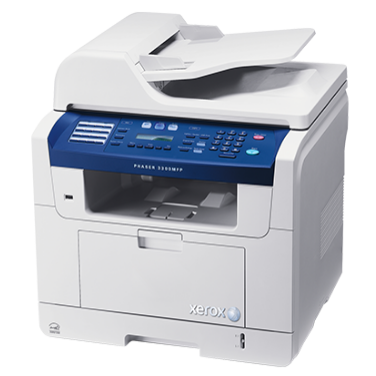
The Xerox Phaser 3300 MFP is a compact monochrome multifunction laser printer that brings printing, copying, scanning and faxing to smaller offices in a single machine. It uses the high-yield 106R01412 toner cartridge, and on this page that cartridge is stocked in compatible form in 2-packs and 4-packs — an affordable entry point into keeping a Xerox multifunction supplied.
A multifunction machine changes how toner gets used. The same cartridge that prints the office's documents also makes its copies, so a 3300 MFP in a small team's hands consumes toner through two doors at once. That is the practical reason this model was built around a high-yield cartridge, and why buying it in multi-packs suits the machine: the supply cupboard, not the printer, should be where the planning happens.
Toner Cartridges for Phaser 3300 MFP
| Cartridge | Color | Page Yield |
|---|---|---|
| 106R01412 — Black, 2 Pack | Black | See product page |
| 106R01412 — Black, 4 Pack | Black | See product page |
Which cartridge should you buy?
There is only one cartridge decision on this machine — the 106R01412 is the high-yield black toner the 3300 MFP uses — so the real question is pack size. The 2-pack fits a small office that prints and copies steadily but not heavily: one cartridge working, one in reserve, and a natural moment to reorder when the reserve goes into the machine. The 4-pack suits the office where the MFP is the only printer and sits at the center of the day's paperwork; copying jobs in particular can move through toner faster than expected, and a deeper reserve keeps a busy week from ending at an empty machine. Either way, buying the cartridge in a pack costs less per cartridge than chasing singles one at a time.
Chip, toner and everyday use
The compatible 106R01412 cartridges are chipped for this machine, so the 3300 MFP accepts them and reports toner status across both printing and copying. When output starts to fade, open the front cover, take the cartridge out and rock it gently from side to side — the toner inside redistributes and often restores solid blacks for a good while longer. Keep unopened cartridges sealed, flat and away from heat and bright light. And remember the rating behind any yield figure assumes about 5% page coverage; an office copying full-page forms all day will see a cartridge finish sooner than the estimate.
Frequently Asked Questions
What toner does the Phaser 3300 MFP use?
It uses the high-yield 106R01412 black toner cartridge. This page stocks it in compatible form in 2-packs and 4-packs.
Why is the cartridge sold in multi-packs here?
Because that is how this machine is best supplied: it prints and copies from the same cartridge, so having the next one already on the shelf keeps a small office from stalling when a cartridge ends mid-week.
How do I change the cartridge in the Phaser 3300 MFP?
Open the front cover, pull out the used cartridge, rock the new 106R01412 gently side to side, insert it firmly until it seats, and close the cover. The machine is ready for printing and copying again right away.
Are compatible cartridges for the 3300 MFP covered by a warranty?
Yes. Compatible cartridges from Clever Supplies carry a 1-year warranty and 1-year returns, so a cartridge that fails early is replaced or refunded.