




Phaser 3100
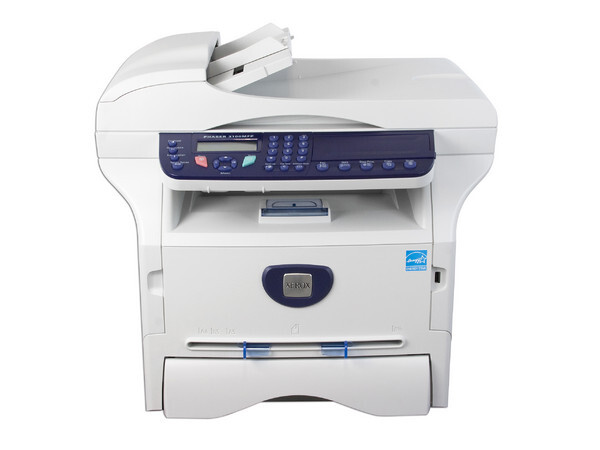
Designed for the office, the Xerox Phaser 3100 is a laser printer that handles daily workloads with ease, and administrators appreciate its simple driver setup and routine maintenance. Supplies could hardly be simpler: this model runs on one high-yield black cartridge, the 106R01379, which runs to about 4,000 pages before it needs swapping.
One part number is the whole story here, and that is a genuine virtue in a shared office. Whoever orders supplies never has to ask which of four cartridges the machine takes, and there is no standard-yield variant to buy by mistake. The choice on this page is only about listing line and pack size — the cartridge inside is the same high-yield unit throughout.
Toner Cartridges for Phaser 3100
Yields are per cartridge; a multi-pack simply holds more of the same unit.
| Cartridge | Color | Page Yield |
|---|---|---|
| 106R01379 high yield, single | Black | Approx. 4,000 pages |
| 106R01379, single cartridge (3100 listing) | Black | Approx. 4,000 pages |
| 106R01379 high yield, single (Phaser 3100 listing) | Black | Approx. 4,000 pages |
| 106R01379, 2 pack | Black | Approx. 4,000 pages |
| 106R01379, 3 pack | Black | Approx. 4,000 pages |
| 106R01379 high yield, 5 pack | Black | Approx. 4,000 pages |
| 106R01379, 5 pack | Black | Approx. 4,000 pages |
| 106R01379 high yield, 5 pack (Phaser 3100 listing) | Black | Approx. 4,000 pages |
| 106R01379 premium, 5 pack | Black | Approx. 4,000 pages |
| 106R01379, 10 pack | Black | Approx. 4,000 pages |
Which cartridge should you buy?
Since every option is the same high-yield cartridge, buy on quantity and habit. A single suits a Phaser 3100 that prints a few dozen pages a week. Offices that print daily should hold at least one spare, which makes the 2 pack and 3 pack the practical middle ground — the machine never waits on a delivery. The 5 pack and 10 pack listings serve busier floors and anyone standardizing on this cartridge across several printers; fewer orders, fewer interruptions. Because the cartridge is already the high-yield version, there is no upgrade decision hiding underneath: cost per page is settled by the cartridge design, and pack size only changes how often you reorder. Every compatible cartridge on this page is covered by a 1-year warranty and 1-year returns.
Chip, toner and everyday use
Fitting a fresh cartridge is a two-minute job: power the printer on, open the toner access cover, pull the spent unit straight out, rock the new one gently side to side so the toner settles evenly, then slide it in until it seats and close the cover. The chip is read automatically, so the level gauge resets without menus or codes. Yields are rated at 5% page coverage, the industry convention — a month of dense reports will use a cartridge faster than a month of short letters. Keep spares sealed in a cool, dry spot away from direct sunlight.
Frequently Asked Questions
Which toner cartridge fits the Phaser 3100?
Only one: the 106R01379 high-yield black cartridge. Every listing on this page is that cartridge, differing only in pack size and listing line.
Is there a standard-yield cartridge for this printer?
The cartridge stocked for the Phaser 3100 is the high-yield version, rated at about 4,000 pages. There is no smaller standard-yield option among the listings above.
How many pages does one cartridge print?
Around 4,000 pages at the standard 5% coverage measure. Pages with heavy text, tables or graphics use toner faster, so real-world life varies with what you print.
Should I buy a single or a multi-pack?
Buy a single if the printer is lightly used and a delivery delay would not hurt. Choose a 2 pack or larger when the machine supports a team — the spare on the shelf is what keeps a toner warning from becoming a work stoppage.
More printers that use the same cartridges
Three multifunction variants in the same line pour from the same cartridge: Phaser 3100MFP, Phaser 3100MFP/S, Phaser 3100MFP/X.