




MX317DN
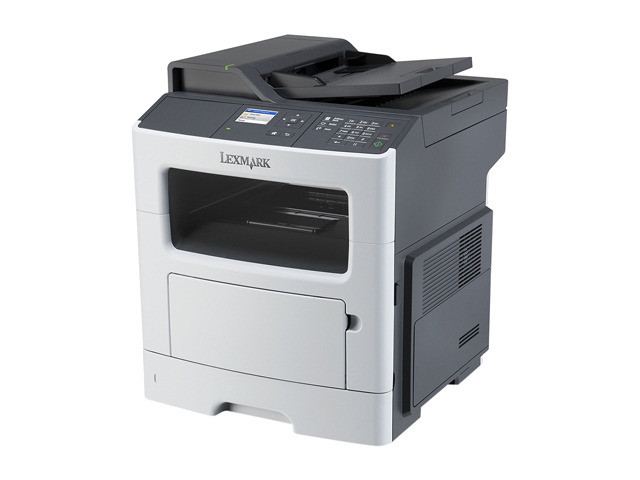
Print, copy, scan and fax share one footprint in the Lexmark MX317DN, the multifunction sibling of the MS317 line — and they share one cartridge, too. Everyday output runs on the 51B00A0 black cartridge, rated at about 2,500 pages per unit, with duplexing and networking fitted as standard. This page sells that cartridge in single, 2-pack and 4-pack listings, under MX317DN and MS317DN names alike.
Four office functions in a single device usually means four supply headaches; here it means one. Copies roll off the same cartridge as network print jobs, received faxes print from it too, and scanning — the one function that uses no toner — costs nothing at all. For a small office that wants everything in one machine without a premium on supplies, that single-cartridge design is the deciding feature, and it is why this MFP stays cheap to run long after the purchase price is forgotten.
Toner Cartridges for MX317DN
| Cartridge | Color | Yield |
|---|---|---|
| 51B00A0 Black — MX317DN listing, 2 Pack | Black | About 2,500 pages |
| 51B00A0 Black — MX317DN listing, 4 Pack | Black | About 2,500 pages |
| 51B00A0 Black — MX317DN listing, Single | Black | About 2,500 pages |
| 51B00A0 Black — MS317DN listing, 2 Pack | Black | About 2,500 pages |
| 51B00A0 Black — MS317DN listing, 4 Pack | Black | About 2,500 pages |
| 51B00A0 Black — MS317DN listing, Single | Black | About 2,500 pages |
Which cartridge should you buy?
An MFP quietly out-eats a printer on the same desk, because copies and printed faxes add volume nobody planned for. Plan for it: the 2-pack is the sensible default for the MX317DN, keeping a cartridge in reserve for the day a big copy job lands, and copy-heavy offices will be happier on the 4-pack. Singles suit a lightly used machine or a first compatible trial. If your volume keeps climbing past what the standard-yield 51B00A0 (about 2,500 pages) comfortably serves, the family’s higher-yield 511H (51B1H00, about 8,500 pages) and 511X (51B0XA0, about 20,000 pages) exist for exactly that step up; everything listed below is the standard cartridge in three counts.
Chip, toner and everyday use
After you install a fresh cartridge in the MX317DN, run one copy before you walk away: a copy exercises the same toner path as a print and shows immediately whether the new unit is seated and laying down even coverage. If the control panel misreads the cartridge, open the cover, reseat it firmly and let the machine re-register the chip. Store the spare beside the machine rather than in a stockroom — on an all-in-one, the person who discovers the empty cartridge is usually the person standing there with a deadline.
Frequently Asked Questions
Which toner cartridge does the Lexmark MX317DN take?
The 51B00A0 black cartridge, rated at roughly 2,500 pages. It powers every function that puts toner on paper — printing, copying and received faxes alike.
Does copying use the same cartridge as printing?
Yes. A copy is a print of a scanned original, so copies draw on the same 51B00A0 cartridge. Scanning a document to email or a folder is the only everyday function that uses no toner at all.
Is the cartridge the same as the one in the MS317DN?
Identical. The MX317DN is the multifunction sibling of the MS317DN, and the two machines share the cartridge shelf completely — which is why this page’s listings carry both model names.
How long does one cartridge last in an MX317DN?
The rating is about 2,500 pages at 5% coverage. An office that copies heavily will cycle through cartridges faster than the rating suggests, which is why the multi-pack listings exist.
More printers that use the same cartridges
The print-only sibling takes the identical cartridge, so spares cross over freely: