




BizHub C650
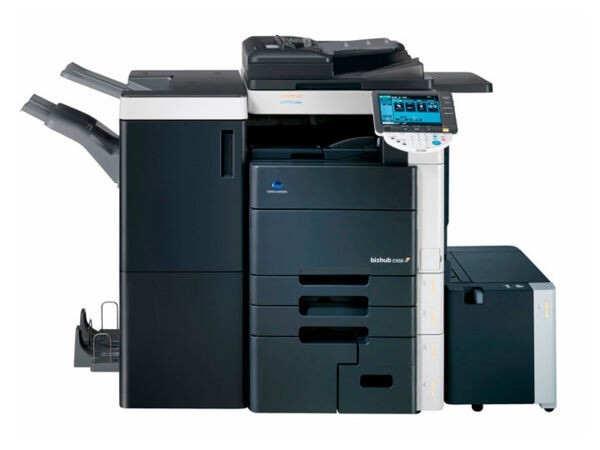
The BizHub C650 sits at the very top of the TN-611 color range — the maximum-volume departmental machine on that platform. It prints from four individual cartridges, one per color, each replaced on its own as it empties. The cartridge stocked on this page is the magenta: the TN-611M, which Konica Minolta also numbers A070330. Its shelf mates are the TN-611K in black, the TN-611C in cyan and the TN-611Y in yellow.
A machine in this class earns its keep on long, color-heavy runs: in-house marketing material, client proofs, presentation decks by the hundred. Volume like that turns toner into one of the largest running costs the department carries, and the cost rarely drains evenly — the colors a design leans on empty first while the others idle near full. The four-cartridge layout is the control you have over that. Each color is bought, stocked and replaced as a separate line item, so spending follows your actual output instead of a fixed full-set habit.
Toner Cartridges for BizHub C650
| Cartridge | Color | Page Yield |
|---|---|---|
| A070330 (TN-611M) | Magenta | See product page |
Which cartridge should you buy?
Buy against the gauge, and against your own replacement history. Magenta is the cartridge proof-driven work leans on hardest — skin tones, brand reds and photographic gradients all draw on it — so on a C650 that prints client-facing color, keeping a spare TN-611M within reach is what stands between a long run and an interrupted one. Order each color under its own TN-611 code as its level falls rather than reflexively replacing the set: on a high-volume machine, the cartridges you did not need are the most expensive ones in the cabinet. A month or two of watching which colors you actually change tells you the machine's real appetite, and after that the reorder pattern writes itself.
Chip, toner and everyday use
On a high-coverage production machine, a cartridge near the end of its life can print faded pages well before the low warning appears — the gauge measures what is left, not how evenly it is coating. When output washes out, remove the suspect color, rock it gently from side to side to redistribute the toner, and reseat it firmly so its chip registers; if the fading survives that, the cartridge is spent regardless of what the level claims. Spares for a machine this busy deserve a cool, dark shelf away from the heat the printer itself generates, kept sealed until the moment they are needed. Compatible TN-611 cartridges carry a 1-year warranty and 1-year returns.
Frequently Asked Questions
The C650 is a production-class machine. Is its toner setup different from smaller BizHub models?
No. The arrangement is the familiar one — a separate cartridge per color from the TN-611 set — and what changes at this end of the range is volume, not design. In a high-throughput room the sensible habit is keeping backup cartridges on hand so a long run is never paused by a single empty color.
We print marketing proofs on our C650. How do we keep color costs predictable?
Track which colors you replace across a month or two. Proof work drains the TN-611 colors unevenly, and once you can see your own pattern you can stock spares to match it instead of buying full sets on a schedule, which smooths consumable spending considerably.
Pages look washed out even though the panel still shows toner remaining. What is going on?
Most likely a cartridge in its last stretch: near-empty toner coats unevenly before the warning triggers, especially under heavy coverage. Remove that color, rock it gently side to side, and reseat it. If the wash returns within a few pages, replace the cartridge — the remaining toner is no longer usable density.
More printers that use the same cartridges
The TN-611 family also serves the BizHub C451 and the BizHub C550.