




LASERJET 1300
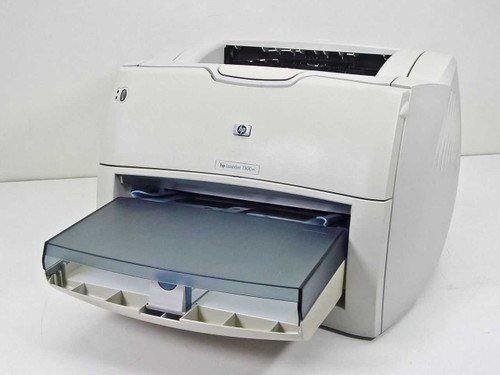
The LaserJet 1300 is a 2004-era monochrome office printer designed around one idea: dependable printing for SOHO users. Setup is simple, and the supply chain for its toner is deep and mature. It takes two cartridges from the same family — the standard Q2613A and the high-yield Q2613X — and this page stocks the high-yield HP 13X cartridge as Clever Supplies compatibles, singly and in multi-packs.
Two decades on, the 1300 survives in the corners of small offices for an unglamorous reason: it keeps working. Machines like this one print the occasional label, letter and invoice without demanding attention, and their owners value a supply shelf that behaves the same way. A backup cartridge next to a printer of this vintage is simple insurance against a stalled workday — when a veteran machine finally runs dry, the fix should take minutes, not a research project.
Toner Cartridges for LASERJET 1300
| Cartridge | Color | Page Yield |
|---|---|---|
| Q2613X high-yield cartridge, single | Black | See product page |
| Q2613X high-yield cartridge, single, alternate listing | Black | See product page |
| Q2613X high-yield cartridge, single, second alternate listing | Black | See product page |
| Q2613A and Q2613X cartridges, 2-pack | Black | See product page |
| Q2613X and Q2613A cartridges, 4-pack | Black | See product page |
Which cartridge should you buy?
The choice is between the two yields of one family. The standard Q2613A suits the 1300's typical second-printer workload — occasional documents, long quiet stretches, no rush. The high-yield Q2613X holds more toner in the same fitting, so it wins whenever the machine still handles regular weekly output; yields are quoted at 5% coverage, and a veteran printer's real consumption depends on what you print. Singles cover the light pattern, while the 2-pack and 4-pack listings keep a sealed spare beside a machine that cannot be allowed to stop. Every compatible cartridge here is backed by a 1-year warranty and 1-year returns.
Chip, toner and everyday use
On a printer of this age, supplies discipline is mostly about storage and seals. Keep the spare sealed in its bag, flat and away from heat, and rotate it in when the installed cartridge fades rather than by the calendar. Before blaming a new cartridge for pale output, confirm its protective seal came out completely — a half-pulled strip is the classic culprit — and run the printer's cleaning cycle from its menu. A gentle side-to-side rock redistributes toner inside a tiring cartridge and often restores even pages for a while.
Frequently Asked Questions
Which toner cartridges work with the LASERJET 1300?
Two codes from one family: the standard Q2613A and the high-yield Q2613X. Any cartridge carrying one of those codes is the right type for this printer; the code on your empty cartridge settles which one to reorder.
How can I check how much toner is left in my LASERJET 1300?
Print a supplies-status page from the control panel, or view the levels in the printer software on your computer. Plan the replacement when the installed cartridge runs low or pages begin to fade — with a spare already on the shelf, there is no need to guess early.
Why is my LASERJET 1300 printing faded pages?
First confirm the protective seal was fully removed from the cartridge, then run a cleaning cycle from the printer's menu. If fading continues after both steps, the cartridge is most likely running low or has reached the end of its life.
Is there a high-yield option for the LaserJet 1300?
Yes — the 13X cartridge, coded Q2613X, is the family's high-yield member and fits the same slot as the standard cartridge. It is the natural pick if the printer still sees regular use.
More printers that use the same cartridges
These printers take the same cartridges, so the listings above fit them as well: HP Q2613A, Laserjet 1300, Laserjet 1300N, Laserjet 1300T, Laserjet 1300XI.