




COLOR LASERJET 3600DN
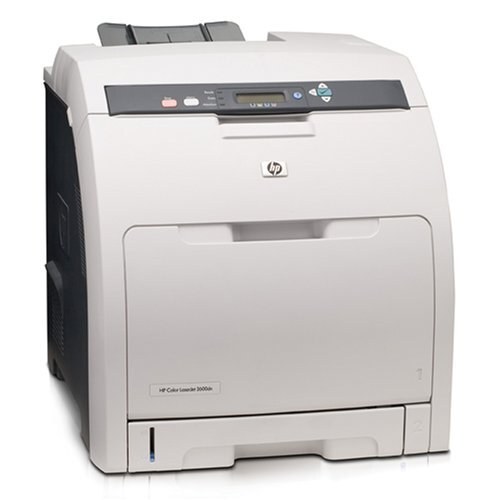
Duplexing and networking made the HP Color LaserJet 3600DN the office-savvy member of the compact 3600 line: a shared printer that prints on both sides by itself and fits a small workgroup budget. Its toner is the Q6470A black, also sold as the 501A, with the 502A colors beside it — Q6471A cyan, Q6472A yellow and Q6473A magenta. For busier months the black slot also runs the extended-yield Q6470X (501X) and magenta the Q6473X (502X). Compatible and genuine OEM cartridges for the 3600DN are both stocked here.
A networked 3600DN usually sits where a whole team can reach it, turning out two-sided reports, handouts and drafts that would otherwise burn paper one side at a time. Because several people draw on the same four cartridges, toner planning matters more than on a personal machine: the office that keeps an eye on levels and a spare on hand never has the shared printer sit idle at the wrong moment. The shelf also holds an eight-cartridge set from the later CE250A generation, stocked for the CP3525 and CM3530 machines that followed — handy for offices running both generations, but not a 3600DN cartridge.
Toner Cartridges for Color LaserJet 3600DN
- 501A / Q6470A set — Black; yield: see product page
- 501X / Q6470X — Black; yield: see product page
- 502X / Q6473X — Magenta; yield: see product page
- 501A / 502A / Q6470A / Q6471A / Q6472A / Q6473A set — 4 Color Set; yield: see product page
- 3600dn 4 Color Set — 4 Color Set; yield: see product page
- Q6470A / 501A — Black; yield: see product page
- Q6471A / 502A — Cyan; yield: see product page
- Q6472A / 502A — Yellow; yield: see product page
- Q6473A / 502A — Magenta; yield: see product page
- Q6470A — Black; yield: see product page
- Q6470A / Q7581A / Q7582A / Q7583A set — 5 Color Set; yield: see product page
- Q6470A — Black; yield: see product page
- Q6471A — Cyan; yield: see product page
- Q6473A — Magenta; yield: see product page
- 504A / Q6470A / Q7581A / Q7582A / Q7583A set — 5 Color Set; yield: see product page
- Q6470A / Q7581A / Q7582A / Q7583A set — 4 Color Set; yield: see product page
Beyond the core range above, this page carries further listings from the same families, including sets and singles labeled for sister models:
HP 3800dtn (Q6470A Q7581A Q7582A Q7583A) 4 Color Set, HP 3600 (Q6470A) 3 Black, HP 3600 (Q6471A) Cyan, HP 3600n (Q6471A Q6472A Q6473A) 3 Color Set, HP 3600n (Q6470A) Black, HP 3600n (Q6473A) Magenta, HP 3600n (Q6472A) Yellow, HP 3800 (Q6470A) 5 Black, HP 3800dtn (Q6470A) 3 Black, HP 3800dtn (Q6470A) Black, HP 3800n (Q6470A) 2 Black, HP 3800n (Q6470A) 3 Black, HP 502A (CE250A CE251A CE252A CE253A) 8 Color Set, HP CP3505n (Q6470A) 2 Black, HP CP3505n (Q6470A) Black, HP 3600 (Q6470A Q7581A Q7582A Q7583A) 4 Color Set, HP 3600n (Q6470A Q7581A Q7582A Q7583A) 4 Color Set, HP CP3505DN (Q6472A) Yellow
Which cartridge should you buy?
On a shared machine, black is the cartridge that disappears first, and the extended-yield Q6470X is the simplest way to widen the gap between changes; magenta follows the same pattern with the Q6473X if your team prints color-heavy decks. Duplexing saves paper, not toner, so do not let the paper saving disguise how fast a busy month empties cartridges. A four-color set suits a planned refresh when several colors are low together, while single cartridges keep costs honest the rest of the time. Every compatible cartridge here is covered by a 1-year warranty with 1-year returns.
Chip, toner and everyday use
If the 3600DN reports that a cartridge is not recognized, open the door and press the cartridge firmly home before suspecting the chip — a cartridge resting a fraction short of its seat is the common cause. Remove the full length of sealing tape at install, since a torn remnant left inside will mark every page. Store spare cartridges flat, in their bags, away from direct light, and rotate stock so the oldest box is used first. Quoted yields assume about 5% page coverage; dense color pages will call for replacements sooner than the estimate suggests.
Frequently Asked Questions
Does the 3600DN print on both sides of the page by itself?
Yes — duplexing is built in, so two-sided printing is automatic once you select it in the print driver. It is the feature that separates the DN from the base 3600, and it changes paper use, not toner: the same Q6470A black and 502A color cartridges serve the machine either way.
Which cartridges fit the Color LaserJet 3600DN?
The black is the Q6470A (501A); the colors are Q6471A cyan, Q6472A yellow and Q6473A magenta from the 502A series. Extended-yield versions exist for black (Q6470X) and magenta (Q6473X). Always match the code printed on the cartridge being replaced.
Can the 3600DN use compatible toner, or genuine HP only?
Both fit and both are stocked on this page. A compatible cartridge built for the Q6470A family seats and reads the same way as the genuine HP version; what matters is the cartridge code, not whose name is on the box.
One color is printing light while the others look fine. What should I do?
Replace just that color. The four cartridges are independent, so a faded magenta never obliges you to touch black, cyan or yellow. Before ordering, rock the light cartridge gently side to side — if output recovers briefly, its toner is nearly gone and a replacement is due.
More printers that use the same cartridges
These related models and cartridge pages draw on the same toner family: HP 501A-503A, HP 501A-502A, Color LaserJet CP3505X, Color LaserJet CP3505N, Color LaserJet CP3505DN, Color LaserJet CP3505, Color LaserJet 3800N, Color LaserJet 3800DTN, Color LaserJet 3800, Color LaserJet 3600, COLOR LASERJET 3800DN, COLOR LASERJET 3600N