




CS-300CI
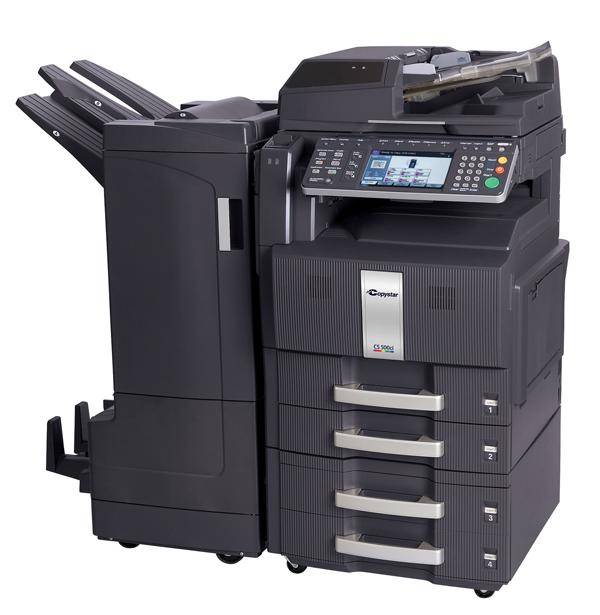
The CS-300CI is a color multifunction copier carrying the Copystar badge — Kyocera's brand for the United States — and it is the same machine that Kyocera-badged fleets run as the TASKalfa 300CI. It draws its color from the TK-867 family, and two of those cartridges are stocked on this page: the cyan TK-867C, part number 1T02JZCUS0, and the magenta TK-867M, part number 1T02JZBUS0. Both are single cartridges, ordered one at a time when the copier reports that color low.
A color copier means watching four separate toner levels, and the two colors gathered here are the ones this shelf covers. Cyan and magenta do quiet work in the background of office color — skin tones, skies, brand colors — and they tend to drain together over months of mixed printing. When prints start drifting off-color, the cause is usually one of these two cartridges nearing empty, and the fix is a single cartridge swap. The same pair also feeds the smaller CS-250CI, so offices running both models share one spare shelf.
Toner Cartridges for CS-300CI
| Cartridge | Color | Type | Page Yield |
|---|---|---|---|
| TK-867C (1T02JZCUS0) Toner Cartridge Cyan | Cyan | Toner cartridge | See product page |
| TK-867M (1T02JZBUS0) Toner Cartridge Magenta | Magenta | Toner cartridge | See product page |
Which cartridge should you buy?
The machine tells you which one: trust the color named in the low-toner message, not the tint of the last printout. A page that looks too blue-green is often short of magenta, and a page that looks pink is often short of cyan, so guessing from the output alone leads to the wrong box. If both colors are flagged low together, order both singles in the same shipment so the copier comes back to full color in one maintenance pass instead of two. There is no set or multipack of these cartridges on this page — just the two singles, each a compatible cartridge with a one-year warranty and one-year returns behind it.
Chip, toner and everyday use
Change one color at a time and keep the other cartridges in place while you work; the copier tracks each slot separately and reads the new cartridge as soon as it clicks in. Before a new unit goes in, a few gentle end-to-end rocks help settle the toner for even first pages. Keep spare color cartridges boxed until their turn — sunlight and heat age an opened cartridge faster than time on a shelf does. If a freshly installed color still prints weakly, reseat it once and run the machine's color calibration from the panel before assuming the cartridge is at fault. Gloves are not required for the job, but wash your hands afterward — color toner shows on skin and cuffs long after the cover is closed.
Frequently Asked Questions
Are the CS-300CI and TASKalfa 300CI cartridges the same?
Yes. The two names describe one copier sold under Kyocera's two badges — Copystar in the United States, Kyocera on the TASKalfa 300CI nameplate — and the TK-867C and TK-867M cartridges fit both.
The panel is showing the number 1T02JZCUS0 — what do I order?
That part number is the cyan cartridge. It is listed here as the TK-867C; the family name and the part number refer to the same cartridge, so either one is a safe search term.
Color prints look washed out overall — which cartridge is responsible?
Washed-out color usually means one color is nearly empty rather than all of them failing together. Check the level display for cyan and magenta first; the low one is the cartridge to change, and both of those colors are the ones stocked on this page. If both levels read healthy and the output still looks pale, run the panel calibration before replacing anything, since a drifted setting can mimic an empty cartridge.
Can I buy the cyan and magenta as a combined set?
No combined set is listed for the CS-300CI here. The cyan and magenta are sold as individual cartridges, so a restock of both colors means adding the two singles to the same order.
More printers that use the same cartridges
These TK-867 color cartridges also serve: TASKalfa 250CI, TASKalfa 300CI, TASKalfa 300i, CS-250CI.