







 See Compatible Printers
 Read more about our ink!
Xerox
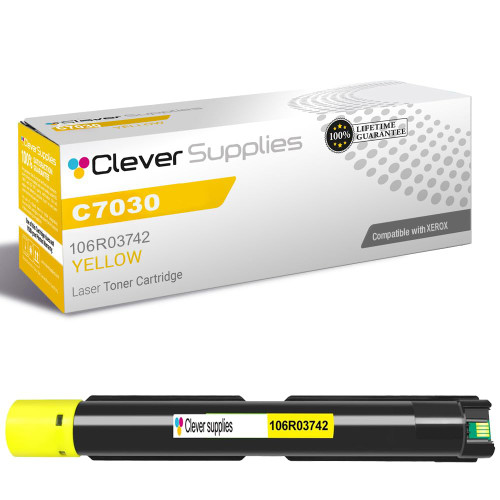
Compatible Xerox C7030 (106R03742) Toner Cartridge Yellow
- Page Yield:
- Color: 9800
- Availability:
- In Stock
- Shipping:
- Free Shipping

Amazon Price:

- Page Yield:
- Color: 9800
- Availability:
- In Stock
- Shipping:
- Free Shipping
- Compatible Printers
- Specifications
- SKU:
- CS-Xerox-C7030-Y
- Printer Brand:
- Xerox
- OEM Number:
- 106R03742
- Ink Color:
- Yellow
- Page Yield:
- Color: 9800
- Printer Type:
- Laser Cartridge
- Condition:
- New Compatible
- Description
- Reviews

/> 

Achieve exceptional print quality with the Xerox C7030 toner cartridge series, featuring 106R03741 Black, 106R03744 Cyan, 106R03743 Magenta, and 106R03742 Yellow. These compatible Xerox cartridges are designed to produce deep blacks and vivid, rich colors for all your printing needs. Built for reliability and performance, the Xerox C7030 toner cartridge delivers consistent output and sharp results across every page. Whether you're printing everyday office documents or high-resolution graphics, these cartridges ensure professional-quality prints from start to finish. Compatible with VERSALINK C7020, VERSALINK C7025, and VERSALINK C7030 printers, these toner cartridges are easy to install and work seamlessly with your Xerox device. Their precision engineering supports efficient printing and minimizes downtime. Trust the Xerox C7030 toner cartridge to handle demanding workloads with ease. Designed for business environments that require high-performance printing, these cartridges provide the clarity, color accuracy, and durability your work depends on.
Frequently Asked Questions
We "barely print in color," yet the yellow ran out first — where did it all go?
Into pages nobody counted as color work. Printed web pages carry colored banners and photographs, emailed spreadsheets arrive with shaded headers and highlighted cells, and every chart screenshot pasted into a report is a full-color page wearing a business suit. The Versalink C7030 lays yellow into all of them, a little at a time, across thousands of supposedly plain documents. When the empty warning arrives, it feels sudden — in truth the cartridge has been quietly draining itself into "black-and-white" work for months.
Can we check the yellow level from a desk, without walking to the machine or printing a test page?
Yes, two ways. The supplies screen on the printer's own panel shows each toner as a percentage, and the same readings appear in the printer's built-in web interface, which anyone on the office network can open from a browser by typing in the machine's address. For yellow specifically, that number matters more than any visual check: the printed page will look almost normal until the supply is nearly gone, so the percentage is the only early warning you get. A thirty-second look once a week beats a surprise on deadline morning.
This C7030 yellow appears in more than one listing — are we choosing between different cartridges?
No. It is one and the same product wearing two shop windows: some buyers search by the machine on their desk, others by the part number on the empty cartridge, so the cartridge is listed both ways. Whichever listing you order from, the box that arrives holds the same compatible yellow cartridge — part number 106R03742, the same $95.14 price, the same rating of up to 9,800 pages. There is no better or worse version hiding behind the other listing.
The spent cartridge in the drawer is labeled 106R03742 — does that settle the reorder question on its own?
It does, and it is the most reliable method there is. Color names get reused across product generations, and model names get confused between floors of the same building, but the part number printed on the unit you just pulled out identifies exactly one replacement. Match that number to this listing and the cartridge that arrives will be the one your empty slot is shaped for. Keeping the spent unit on the shelf until the new one lands is a sensible habit for any shared machine.
How should a sealed spare be stored so it is still perfect months from now?
Flat, in its sealed box, in an ordinary office environment. Toner cartridges ask for nothing exotic: keep the box out of direct sunlight, away from radiators and hot storerooms, and off the floor of anywhere damp. Stored that way, a spare waits patiently alongside the machine until the gauge calls for it. When the day comes, the swap itself is a front-cover job — out with the spent unit by its handle, in with the fresh one until it seats, cover closed.
If the cartridge arrives and something is not right, what is the path back?
A short one. The cartridge carries a 1-year warranty, and returns are free for a full year — the steps and terms are laid out on our shipping and returns page. Orders are stocked in Illinois, Pennsylvania, Georgia and California so replacements travel fast, and if you would rather talk it through, support answers Monday to Friday, 9 AM to 5 PM CST.
One month our yellow lasts ages, the next it seems to vanish. What explains the swing?
Coverage, month by month. The 106R03742 is rated at up to 9,800 pages of standard office coverage, but a month of photo-heavy presentations and full-color handouts lays down several times that density per page, while a month of correspondence barely sips. The cartridge is not inconsistent — the work is. Judge its life by the kind of pages your C7030 printed, not by the calendar alone.
One thing this listing cannot show you: this shelf sells only the High Capacity tier of a three-tier ladder — the Extra-High and Metered codes are not stocked here — the yields are declared under ISO/IEC 19798, and every saving in the copy is figured at base prices rather than the prices checkout charges. Our Best Xerox 106R03741 Toner Cartridges guide rebuilds the arithmetic at sale prices and sets out which of the three VersaLink models each box serves.
The fresh yellow is in. Which colors should I inspect on the first page to be sure it is working?
Print something that spends yellow in company. Green is the sharpest witness, since it is built from yellow and cyan together: a clean, leaf-bright green says the new 106R03742 is feeding properly. Orange and warm skin tones confirm the other partnership, with magenta. If those mixtures come back true while a plain yellow patch looks pale, print a few more pages — a new cartridge often needs a short run to settle.
Our supply shelf holds spares for several different printers. How do we keep this cartridge from being grabbed for the wrong machine?
File it by number, label facing out. The 106R03742 belongs to one family only — the VersaLink C7020, C7025 and C7030 — while other machines in the building take yellows with different codes that look much the same in a hurry. A shelf arranged by part number, with the code readable at a glance, stops the wrong-box grab that turns a two-minute swap into a returns conversation.
What do we do with the empty yellow cartridge from a shared machine?
Give empties one home. Keep a single collection carton beside the C7030, and whoever swaps a spent 106R03742 drops it in, in the bag its replacement arrived in. When the carton fills, it goes out in one movement through your recycling or return route. The habit costs nothing, keeps stray toner off the supply shelf, and means no spent units are hiding in desk drawers months later.
About This Xerox 106R03742 Yellow Toner Cartridge — Reorder by Part Number
This listing is the part-number door to the family's shared yellow supply: one compatible cartridge, 106R03742, at $95.14, rated for up to 9,800 pages — roughly 0.97 cents per page at standard coverage. It exists for the buyer standing at the machine with the spent cartridge in hand, matching digits instead of guessing from a model name. The unit behind the number warms every green, orange and cream the department prints, and it serves the whole VersaLink line — the Versalink C7020 and Versalink C7025 alongside the C7030 named here. Everything else we stock is on the Xerox page.