






 See Compatible Printers
 Read more about our ink!
Xerox
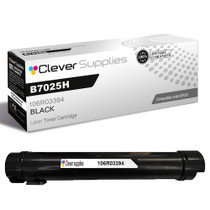
Compatible Xerox B7030 (106R03394) Toner Cartridge Black
- Page Yield:
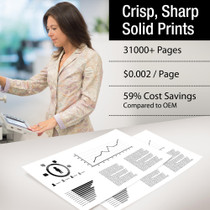
- Black: 31000
- Availability:
- In Stock
- Shipping:
- Free Shipping

Amazon Price:

- Page Yield:
- Black: 31000
- Availability:
- In Stock
- Shipping:
- Free Shipping
- Compatible Printers
- Specifications
- SKU:
- CS-Xerox-B7025H-VERSALINK-B7030-BK
- Printer Brand:
- Xerox
- OEM Number:
- 106R03394
- Ink Color:
- Black
- Page Yield:
- Black: 31000
- Printer Type:
- Laser Cartridge
- Condition:
- New Compatible
- Description
- Reviews

/> 

Produce sharp, high-volume prints with the Xerox B7025H toner cartridge, including the Xerox B7025H 106R03394 BLACK. This high-yield, compatible Xerox cartridge is designed to deliver exceptional print quality and consistent performance for all your professional documents. Optimized for reliability, the Xerox B7025H toner cartridge ensures bold black text and clean lines with every page, reducing the need for reprints and enhancing office productivity. Its the ideal choice for busy work environments that demand efficiency and precision. Compatible with a range of devices including VERSALINK B7025, VERSALINK B7030, and VERSALINK B7035, this toner cartridge offers seamless integration, simple installation, and smooth operation throughout its lifecycle. Trust the Xerox B7025H 106R03394 BLACK to deliver consistent page yield and outstanding results. Whether you're printing reports, manuals, or standard business documents, this toner cartridge supports uninterrupted workflows and professional-grade output every time.
Frequently Asked Questions
Why does the B7030 take the same cartridge as the models either side of it?
Because Xerox designed the three machines as one platform. The Versalink B7025, this Versalink B7030 and the Versalink B7035 differ in speed and paper handling, but all three were built around the single toner supply numbered 106R03394 — this listing is that cartridge, in compatible form, at $57.82.
What does a page cost from this cartridge?
The cartridge is rated at up to 31,000 pages, so at $57.82 the toner runs about 0.19 cents per page. That is the number worth writing into a cost-per-page spreadsheet — on a machine doing departmental volume, fractions of a cent multiply into real money over a cartridge's life.
How is the 31,000-page figure arrived at?
By the standard industry method: pages printed at roughly 5% coverage, a typical text document. Real offices wander either side of it — heavy forms and graphics pull the total down, plain correspondence stretches it out. The rating's job is to let you compare cartridges fairly, and on that basis 31,000 is the largest figure this platform offers.
How many months does one cartridge give a B7030?
The B7030 sits in the middle of the line and usually works accordingly. At 3,000 pages a month, a cartridge lasts around ten months; at 4,000 a month, roughly eight. Plan on toner changes being a twice-a-year-or-less event, and a single spare on the shelf covers the gap years comfortably.
How do I make sure the part number matches?
Check the label of the cartridge you are taking out: 106R03394 is the number to match. Model names in listings vary, and the B7030 appears in plenty of differently-worded pages — the stamped part number on the cartridge itself is the one identifier that never changes.
What stands behind it after the sale?
A one-year warranty and one-year free returns, set out on the shipping and returns page. Orders ship from warehouses in IL, PA, GA and CA, support answers Monday through Friday, 9 AM to 5 PM CST, and the wider range sits on our Xerox toner page.
How can I measure the yield my own B7030 actually gets from one of these?
Note the machine's page counter on the day you fit the cartridge, and again on the day it runs out. The difference is your real figure for the 106R03394 in your office, with your documents — the honest counterpart to the 31,000-page rating, which is measured at about 5% coverage. Two cartridges' worth of those notes and you will know this printer's true rhythm well enough to time every future order without guessing.
Which of our documents will pull the cartridge's life down fastest?
Anything that lays toner across most of the page: dense forms with shaded boxes, full-page tables, presentation pages with dark backgrounds, and long runs of graphics. Plain letters and memos sit close to the light coverage the rating assumes. A B7030 that mostly prints correspondence can beat the rated figure; one fed a steady diet of heavy forms will land under it. The cartridge is the same — the pages decide.
The first pages after fitting look slightly light. Should I worry?
Usually not. Print a familiar document — one you have seen many times — and judge the new cartridge against your memory of it once a handful of pages have passed. A fresh 106R03394 settles in quickly as toner distributes through it, and early pages are not the verdict. What matters is the steady output after that short run-in: even, dense black with no patchiness is a healthy fitting, whatever the very first sheet looked like.
How do I tell a genuinely empty cartridge from a machine problem?
Look at the pattern of the fading. A cartridge near the end of its toner fades evenly across the whole page, and taking it out and rocking it gently side to side often buys back some darkness for a short run — that recovery is the signature of low toner. Fading that repeats in the same position on every sheet, or streaks that survive a cartridge change, point at the machine instead. When it is the cartridge, box the spent unit and send it out with the office's recycling rather than binning it with general waste.
About This B7030 Cartridge
The middle machine of the VersaLink line gets the same big-hearted supply as its siblings: one compatible 106R03394, 31,000 pages of black, $57.82. For a B7030 doing steady departmental work, that is most of a year of printing from a single fitting — and a per-page cost low enough to stop thinking about.
Related Items


Xerox
Compatible Xerox B7030 (106R03394) Toner Cartridge Black 2 Pack
/>


Xerox
Compatible Xerox B7030 (106R03394) Toner Cartridge Black 4 Pack
/>

Xerox
Compatible Xerox B7030 (106R03393) Toner Cartridge Black
/>

Xerox
Compatible Xerox B7025H (106R03394) Toner Cartridge Black