







 See Compatible Printers
 Read more about our ink!
Hewlett Packard
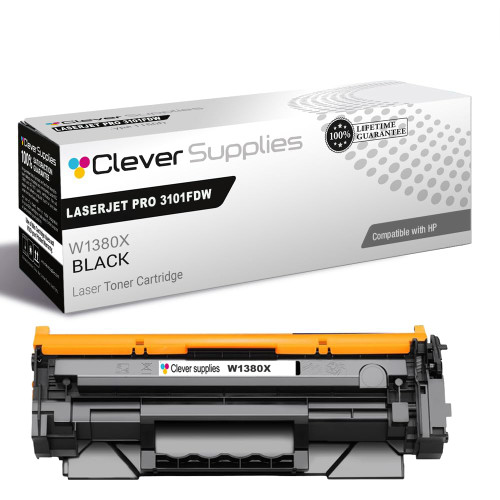
Compatible HP 138X (W1380X) Toner Cartridge Black
- Page Yield:
- Black: 4000
- Availability:
- In Stock
- Shipping:
- Calculated at Checkout

Amazon Price:

- Page Yield:
- Black: 4000
- Availability:
- In Stock
- Shipping:
- Calculated at Checkout
- Compatible Printers
- Specifications
- SKU:
- CS-HP-138X-LASERJET-PRO-3101FDW-BK
- Printer Brand:
- Hewlett Packard
- OEM Number:
- W1380X
- Ink Color:
- Black
- Page Yield:
- Black: 4000
- Printer Type:
- Laser Cartridge
- Condition:
- New Compatible
- Description
- Reviews



Maximize print efficiency with the HP 138X toner cartridge, featuring the HP 138X W1380X BLACK. This high-yield cartridge delivers sharp black text and superior print quality, making it ideal for high-volume printing environments. Designed for reliability, the HP 138X toner cartridge provides consistent results from the first page to the last. Whether you're printing detailed reports or everyday business documents, it ensures clean, professional output with every job. Compatible with LASERJET PRO 3001DW, LASERJET PRO 3002DW, LASERJET PRO 3101FDW, and LASERJET PRO 3102FDW, this toner cartridge integrates seamlessly with your HP printer. Its simple installation process helps minimize downtime and keeps workflows running smoothly. Count on the HP 138X toner cartridge for exceptional performance, extended yield, and outstanding print quality. Its the perfect choice for offices that demand speed, reliability, and consistent results.
Frequently Asked Questions
We print double-sided most of the time. Does that change the 9,200-page figure?
The rating counts printed sides, not sheets. A duplex job of fifty sheets still lays toner on one hundred sides, consuming the cartridge at the same rate as one hundred single-sided pages. Duplexing saves paper, which is worthwhile, but it does not stretch the toner — worth knowing when you estimate how long this W1380X will last.
How do I check the code before I buy?
The cartridge you remove carries the answer on its label: W1380X. That code belongs to the high-yield black supply for the LaserJet Pro 3001dw platform, which includes the LaserJet Pro 3001dw and its MFP 3101 relatives. If your label shows a different code, this is not your cartridge, however similar the printer names may look.
Our pages are dense — tables, bold headings, shaded boxes. Will we see fewer pages?
Yes, and that is normal rather than a fault. The 9,200 figure assumes about five percent of the page is covered. Dense tables and shaded panels can cover three or four times that area, so real-world life drops in proportion — though at heavy coverage this cartridge still covers several thousand pages.
What does the $50.19 include?
One complete high-yield black cartridge, sealed and ready to install, with the imaging drum built in. No refilling, no parts to swap over. Among the HP toner cartridges stocked for this family, it is the choice for desks that measure cartridge life in months.
Is installation something our office manager can do without a technician?
Easily. Open the top cover, pull the old cartridge out by its handle, peel the sealing strip from the new one, and slide it in until it clicks. Print a test page to confirm even density. The job takes a couple of minutes and needs no tools or settings changes.
What if the cartridge disappoints us?
It comes with a 1-year warranty and 1-year free returns; our shipping and returns page explains how both work. Stock ships from warehouses in Illinois, Pennsylvania, Georgia, California, and you can reach support Monday through Friday, 9 AM to 5 PM CST.
Can a spare be kept in a desk drawer instead of a supply cupboard?
Yes, a drawer suits it well. Keep the W1380X sealed in its bag, lying flat, in a drawer away from a radiator or a sunlit window, and it will wait there happily until it is needed. Toner is a dry powder, so nothing dries out or goes stale; a gentle rock side to side before fitting loosens any powder that has settled during the wait.
How do I judge whether a newly fitted cartridge is performing as it should?
Reprint a page you know. Take a document that printed pale or uneven with the old cartridge and run it again: with a sound W1380X the same page comes out deep, sharp, and even across its full width. Judge the cartridge on that comparison rather than on the printer's first warm-up page, and check sooner rather than later — a cartridge that starts well rarely changes character midway through its life.
My colleague orders by printer name alone. Why is that a risky habit here?
Because several LaserJet Pro models carry similar names but take entirely different supplies, and this platform also has two yields of the same cartridge. The safe reference is the code: W1380X, written on the label of the cartridge coming out. A reorder card kept with the printer, carrying that code, lets anyone place the order correctly without opening the machine or interpreting lookalike model names.
Should I throw the old cartridge away the moment the new one goes in?
Not the same hour. Box the spent W1380X and keep it for a few days while the replacement proves itself on real work. If the new unit misprints, the old one helps show what changed and supports any claim. Once the new cartridge has printed cleanly through several ordinary days, the empty can go out through your local cartridge recycling or waste arrangements.
About This HP 138X Toner Cartridge
This compatible HP 138X (W1380X) cartridge is written for offices that count pages honestly: duplex sides, dense tables and all. Its 9,200-page rating gives a realistic planning number for a hard-working desktop LaserJet, and the all-in-one design — toner and drum in one unit — keeps the swap as simple as the maths.
The full fit list runs to four machines: the LaserJet Pro 3001dw, the LaserJet Pro 3002dw, the LaserJet Pro 3101fdw and the LaserJet Pro 3102fdw. For lighter volumes, the standard-yield 138A (W1380A) cartridge covers the same printers at 2,600 pages per cartridge. The same cartridge comes as a 138X (W1380X) two-pack for shelf spares.
Related Items

Hewlett Packard
Compatible HP 138X (W1380X) Toner Cartridge Black



Hewlett Packard
Compatible HP 138X (W1380X) Toner Cartridge Black


Hewlett Packard
Compatible HP 138X (W1380X) Toner Cartridge Black


Hewlett Packard
Compatible HP 138X (W1380X) Toner Cartridge Black