




LaserClass 3175MS
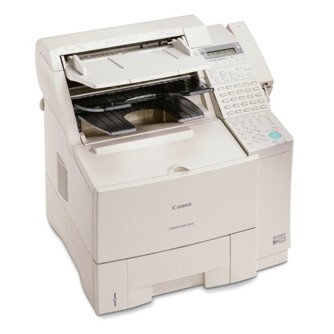
Sitting at the top of the 3170 range, the Canon LaserClass 3175MS is the configuration that arrived with everything already fitted: the PCL printer board is built in rather than left on the options list, the standard paper supply is the larger 500-sheet feed unit, and fax work and print work run side by side on the same engine at 17 ppm. All of that output draws on a single supply, the Canon FX-6 toner cartridge, rated for 5,000 pages. There is no second consumable to track on this machine; when pages start to fade, the FX-6 is the part that changes.
That specification suits an office that wants one substantial unit doing two jobs properly. Incoming faxes land on plain paper, network-side print jobs come through the built-in PCL board, and the 500-sheet tray means the machine is refilled with paper far less often than a compact desktop fax. Ethernet could be added as an option, but the standard setup already covers fax plus parallel printing. For a shared workgroup corner, the 3175MS removes the usual compromise between a dedicated fax and a separate printer.
Toner Cartridges for LaserClass 3175MS
| Cartridge | Color | Page Yield |
|---|---|---|
| Canon FX-6 Toner Cartridge | Black | 5,000 pages |
| Canon FX-6 Toner Cartridges 3 Pack | Black | 5,000 pages per cartridge |
| Canon FX-6 Toner Cartridges 5 Pack | Black | 5,000 pages per cartridge |
| Canon FX-6 Premium Quality Toner Cartridges 5 Pack | Black | 5,000 pages per cartridge |
Which cartridge should you buy?
Start with a single cartridge if the machine is new to you and you want to confirm the fit before stocking up. For a 3175MS in daily shared use, the 3-pack is the sensible working pattern: one cartridge in the machine and spares on the shelf, so a change never waits on a delivery. The two 5-pack routes cover heavier volume — the standard multipack and the Premium Quality line — and at roughly 5,000 pages per cartridge, a 5-pack represents about 25,000 pages of runway for a machine that prints as much as it faxes. Multipacks also bring the cost per page down compared with buying singles one at a time.
Chip, toner and everyday use
Recognition on this generation of Canon fax hardware is refreshingly simple: there is no chip pairing ritual, the cartridge just has to be seated correctly. Pull the sealing tape out fully before fitting, rock the cartridge gently from side to side so the toner inside sits level, then slide it in until it settles home. Store spares flat in their sealed bags, away from sunlight and heat, and they will keep until needed. If a long fax run starts to print light near the end of a cartridge's life, take the cartridge out and rock it again — redistributing what toner remains often carries the machine through until the spare goes in.
Frequently Asked Questions
Does the 3175MS use the same cartridge as the rest of the 3170 line?
Yes. The whole 3170 family on this page runs the FX-6, so a cartridge stocked for the 3175MS also fits the sibling models listed below. Nothing about the MS configuration — the built-in printer board or the larger feed unit — changes the supply.
Will an FX-6 bought for this machine also work in an L1000?
It will. The L1000 belongs to the same FX-6 family, which is why it appears in the list at the bottom of this page. Offices running both machines can hold one shared toner shelf instead of two.
How many pages should I expect from one FX-6?
The rating is 5,000 pages at the standard 5% coverage measure. Real life varies with what you print: a day of dark, dense fax originals uses more toner per page than light text memos, so treat 5,000 as the planning figure rather than a guarantee.
Is the 3-pack or a 5-pack the better buy for a shared office?
It depends on how fast the machine works through paper. A 500-sheet tray emptied daily points to a 5-pack; a machine that sees a tray a week is well served by the 3-pack, with one cartridge working and the rest in reserve.
More printers that use the same cartridges
The FX-6 is shared with a small group of Canon machines: L1000, LaserClass 3170, LaserClass 3170MS, LaserClass 3175.