




ImageRunner 1610F
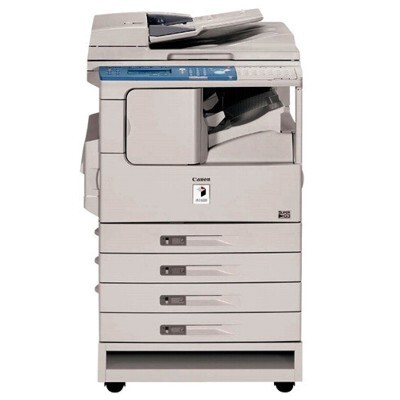
Fax-first is the honest description of the imageRUNNER 1610F. Canon took the 16-ppm copier base of this family and fitted a Super G3 fax modem as standard equipment, aiming the result at offices where the fax line was still a working tool rather than a legacy curiosity. Networking stays on the options list, and automatic duplexing is not part of this generation's specification. Its toner is the family's standard GPR-8 black cartridge, rated for up to 7,850 pages — a healthy rating for a machine whose received faxes print around the clock.
Think of the 1610F as the communications corner of a small office in its era: orders and signed documents arriving by fax, copies for the files, everything landing on one device. That duty cycle is steady rather than bursty, and it rewards a machine with few complications and a cartridge that does not need changing every few weeks.
Toner Cartridges for ImageRunner 1610F
| Cartridge | Color | Page Yield |
|---|---|---|
| GPR-8 | Black | Up to 7,850 pages |
| GPR-8 — 3 Pack | Black | Up to 7,850 pages per cartridge |
| GPR-8 — 5 Pack | Black | Up to 7,850 pages per cartridge |
| GPR-8 — Premium Quality 5 Pack | Black | Up to 7,850 pages per cartridge |
Which cartridge should you buy?
A fax-equipped machine consumes toner on other people's schedules: the sender decides when your printer works. That makes running dry a worse failure here than on an ordinary copier, since a missed cartridge can mean missed documents. Most 1610F owners should therefore buy in depth — the 3 Pack as a minimum working stock, the 5 Pack or Premium Quality 5 Pack where the fax line is busy — and treat the fitted cartridge plus one sealed spare as the floor, never the plan. The good news is the arithmetic: at 7,850 pages per cartridge, even a modest pack covers a long stretch of fax traffic.
Chip, toner and everyday use
Unattended printing changes the housekeeping rules. Keep the paper tray topped up as a daily habit, because a fax machine that runs out of paper holds its documents in memory only until it cannot. When the toner warning appears, act on it the same day rather than stretching the cartridge — rocking it to redistribute toner is a legitimate short bridge, but received faxes print at full density and will show fading early. Store the spare near the machine, sealed and flat, and replace the cartridge in one visit: partially completed supply jobs on a shared office device have a way of staying partial.
Frequently Asked Questions
What toner cartridge fits the imageRUNNER 1610F?
The GPR-8 black cartridge, rated for up to 7,850 pages. It is the standard cartridge for this whole copier family, available here as a single and in multi-packs.
Is fax standard on the 1610F?
Yes — a Super G3 fax modem is fitted as standard, which is what the F in the name stands for. Networking, by contrast, remained an optional extra on this model.
Does the 1610F duplex automatically?
No. Automatic duplexing is not part of this generation's specification; two-sided copies are made by turning the stack and copying the reverse sides manually.
How many pages will one cartridge realistically cover?
Up to 7,850 at the standard 5% coverage rating. Received faxes and dense documents print heavier than that assumption, so a busy fax line should expect a somewhat lower real-world figure and stock accordingly.
More printers that use the same cartridges
The rest of this copier family shares the same cartridge shelf: ImageRunner 1610, ImageRunner 1610FI, ImageRunner 2000, ImageRunner 2010, ImageRunner 2010F, ImageRunner 1600, ImageRunner 1605.