




What Toner Does the Brother MFC-L9570CDWT Use?
Nov 4th 2026
Quick answer: The Brother MFC-L9570CDWT uses the ultra high-yield TN439 toner family — TN439BK black, TN439C cyan, TN439M magenta and TN439Y yellow, rated at about 9,000 pages apiece — and it equally accepts the TN436 super high-yield cartridges it ships with (about 6,500 pages each), the TN433 high-yield size (about 4,500 pages black, 4,000 per color) and the standard TN431 (about 3,000 black, 1,800 per color). Its drum unit is the DR433CL, rated at roughly 50,000 pages. The trailing T marks the bundled 500-sheet paper tray; it has no effect on toner whatsoever.
Why This Variant Exists
The MFC-L9570CDWT is Brother's answer to a specific office layout: one all-in-one that a whole department shares, where the walk to refill paper happens so often it becomes a line item. Under the same print engine, feeder and 7-inch touchscreen as the base MFC-L9570CDW, the bundle adds the LT-340CL 500-sheet tray, taking standard input to about 800 sheets — 250 in the main drawer, 500 in the added one, 50 in the multi-purpose slot. Everything that made the base model a Workhorse flagship carries over untouched: 33-page-per-minute color printing, automatic duplex, an 80-page feeder that scans two-sided originals in one pass at up to 104 images per minute, legal-size glass, fax, and badge authentication through the integrated NFC reader.
The Supply Shelf, in Full
| Cartridge | Black | Cyan | Magenta | Yellow |
|---|---|---|---|---|
| TN439 (ultra high yield) | ~9,000 pages | ~9,000 pages | ~9,000 pages | ~9,000 pages |
| TN436 (super high yield) | ~6,500 pages | ~6,500 pages | ~6,500 pages | ~6,500 pages |
| TN433 (high yield) | ~4,500 pages | ~4,000 pages | ~4,000 pages | ~4,000 pages |
| TN431 (standard yield) | ~3,000 pages | ~1,800 pages | ~1,800 pages | ~1,800 pages |
Yields are Brother's, measured under ISO/IEC 19798 at 5% coverage. Two planning notes follow from the table. First, Brother rates the top two tiers identically across colors, so a color-copying department can forecast all four cartridges on one number. Second, the in-box TN436 set lasts roughly the first 6,500 pages — for a shared machine at Brother's recommended ceiling of 6,000 pages a month, the step up to TN439 territory can arrive within the first quarter, which makes it worth deciding the replacement tier on day one rather than at the first empty warning.
Cost per Page on This Machine
Using our compatible prices from November 2, 2026: a TN439 black works out to about 0.33 cents per page ($29.49 across ~9,000 pages) and each TN439 color to about 0.36 cents ($32.59). The TN436 comes in a step behind — black around 0.42 cents at $27.55, colors around 0.45 cents at $29.46. The TN433, at $28.39 in all four colors, lands near 0.63 cents for black and 0.71 cents for colors. Put against the hardware math, the pattern is consistent: a department that paid extra for an 800-sheet input capacity to reduce human trips to the printer gets the same benefit, doubled, from 9,000-page cartridges — fewer orders, fewer swaps, fewer "printer is down" conversations, at the lowest per-page figure on the shelf.
Every Cartridge, With Its Own Link
Only the color the touchscreen names needs changing, and each one lives on its own page:
Ultra high yield (TN439)
Super high yield (TN436)
High yield (TN433)
Swapping a Cartridge
Power stays on. Open the front cover and slide the toner-and-drum tray out toward you; the four colors sit side by side in their drum units. Press the green lock lever on the spent color's unit, lift its cartridge clear, and rock the replacement side to side a few times before removing the protective cover. Push the new cartridge down until the lever clicks, sweep the drum's green cleaning tab across and back to its home position, and return the tray. Close the cover and the machine recalibrates itself. Sizes can be mixed freely — a TN439 black beside TN436 colors is a perfectly ordinary configuration.
The Four-Color Set, Weighed Honestly
Our compatible TN439 four-color set was $79.02 when checked, and the same four cartridges bought one at a time total $127.26, so the set saves $48.24. For a shared departmental device the set also simplifies life: one purchase order, one delivery, one shelf slot, and all four colors aging on the same clock. Where the set is the wrong call is the single-color outage — one empty cartridge with three healthy ones deserves the single, and the savings math does not change that. Buy sets at full changes; buy singles in between.
A Word on the Drum
Toner is only half the imaging system. The four cartridges plug into the DR433CL drum unit, which Brother rates at about 50,000 pages under typical multi-page use and around 30,000 pages if the workload is mostly single pages. That interval spans roughly five complete rounds of TN439 toner, so it belongs in the maintenance budget, not the supply cupboard. We do not sell a compatible DR433CL today, and this guide links none — when the drum message eventually arrives, the correct move is the genuine unit under that exact part number. Repeating marks at fixed intervals down the page are its tell-tale symptom.
Questions MFC-L9570CDWT Owners Ask
Does the T version take special toner because of the extra tray? No. The tray is paper handling only. Every cartridge that fits the MFC-L9570CDW fits this machine, in every size.
Which drawer should hold which paper? A common arrangement is plain paper in the 500-sheet tray for volume work, letterhead or legal stock in the 250-sheet drawer, and envelopes or labels through the multi-purpose slot.
Can I add the tower tray to this model later? Yes — the family supports the same expansion path as the base model, up to a 2,380-sheet floor-standing configuration, and none of it alters the supply list.
Does heavy scanning shorten cartridge life? Scanning itself uses no toner. Copying is what consumes it, so a scan-and-email workflow stretches every cartridge well past its print-only forecast.
How do I know whether a defect is toner or drum? Swap in a cartridge you know is good. If the mark repeats at the same spacing, the DR433CL drum is the cause; if the page comes clean, the old cartridge was.
Fifty Thousand Pages: The Department's Real Supply Budget
Facilities teams budget this machine by the year, but the honest unit is the drum. One DR433CL life — about 50,000 pages under the multi-page workloads Brother rates it on — carries a department through roughly five and a half complete rounds of TN439 toner. There is no compatible drum for this family, so the genuine unit, at its Brother USA list price checked November 3, 2026, appears in both columns and the contest is toner alone:
| Across one drum life (50,000 pages) | Genuine Brother | Our compatibles |
|---|---|---|
| Black toner — about five and a half cartridges | $619.39 | $163.83 |
| Color toner — about five and a half of each color | $3,124.83 | $543.17 |
| Drum unit — genuine on both paths | $151.99 | $151.99 |
| Total supply spend | $3,896.21 | $858.99 |
| Blended cost per page | ~7.8¢ | ~1.7¢ |
The difference across one drum life is $3,037.22 — real money in any department's ledger. One adjustment for single-page shops: Brother rates this drum nearer 30,000 pages when the workload is mostly one-page jobs, and at that horizon the toner lines above scale to roughly three-fifths, with the same gap between the columns.
Department-Machine Faults and What They Actually Mean
A repeating defect survives a complete toner change. On a shared machine the temptation is to keep swapping colors until the mark moves. Save the toner: a defect that repeats at the same spacing across every cartridge points at the DR433CL drum unit. The swap test described in this article's questions section settles it with one known-good cartridge.
One color prints light right after its cartridge was changed. Before logging a defective cartridge, rock the new one side to side to redistribute its toner and sweep that color's green cleaning tab across its drum section and back. A color that recovers was never empty of toner — it was unevenly fed.
Jobs sit at the machine, unreleased, and users blame supplies. The NFC badge reader is holding them by design. Secure release keeps confidential work off the output tray until its owner is standing there; a queue of held jobs is the security feature succeeding, not the printer failing, and no cartridge will change it.
Which tier for a department — the short version: standardize on the TN439. Across one drum life it means about five and a half full rounds of changes; the TN436 stretches that to nearly eight, and the TN433 tier to eleven or more, each step up the ladder also charging more per page. On a machine whose whole purpose is minimizing human trips, the longest cartridge is the coherent choice.
Key takeaways
- The top cartridge here is rated at 9,000 pages — fewer swaps, lower cost per page.
- Buying the set instead of the individual cartridges saves $48.24.
- Toner and drum are separate parts on this printer — replace only the one the printer asks for.
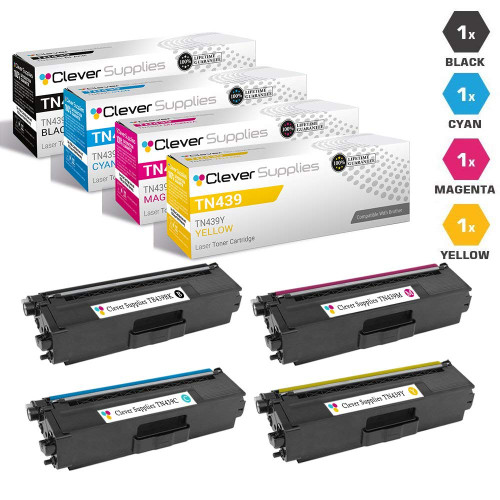 brother tn439 toner cartridge 4 color set tn439bk tn439c tn4
Other Printers That Use TN439
The same cartridges also fit: HL-L9310CDW, HL-L9310CDWT, HL-L9310CDWTT and MFC-L9570CDW.
Ready to order? Start from our MFC-L9570CDWT toner page, which lists every cartridge and set that fits this printer.