




What Toner Does the Brother HL-5340D Use?
Posted by Clever Supplies on Nov 18th 2026
Quick Answer: The Brother HL-5340D uses the TN620 standard-yield black cartridge (about 3,000 pages) or the TN650 high-yield black cartridge (about 8,000 pages), seated in a separate DR620 drum unit (about 25,000 pages). Two toner sizes, one drum, black only — nothing else fits.
The One-Person Printer in a Networked Family
Every other machine in this eleven-model family plugs into a network. The HL-5340D does not. It connects to a single computer by USB — or by a parallel cable, a port Brother still fitted in 2009 for legacy setups — and that solitude defines how it consumes toner. Nobody else in the office can send it a job, no queue builds up overnight, and its page count climbs at exactly one person's pace. Against that workload sit genuinely business-grade mechanics: up to 32 pages per minute, automatic two-sided printing, a 250-sheet main tray plus a 50-sheet multi-purpose tray, and resolution up to 1,200 × 1,200 dpi. Its 16 MB of memory can be expanded if large documents stall it.
That combination — fast engine, slow audience — is why cartridge choice here is less about cost per page than about how often you want to think about toner at all.
What the Two Cartridges Mean for a Solo Desk
| Supply | Rated yield | Our compatible price* | Cost per page |
|---|---|---|---|
| TN620 | ~3,000 pages | $28.86 | ~0.96¢ |
| TN650 | ~8,000 pages | — see note | — |
| DR620 drum | ~25,000 pages | $29.15 | ~0.12¢ |
*Prices isolated from the product pages on November 2, 2026; they can change. We do not currently stock a compatible TN650 single, so that row shows Brother's rated yield without a price; the compatible TN620 is the cartridge we can price today.
Read the table through the solo-user lens. At a few hundred pages a month, a TN620 at roughly a cent a page lasts the better part of a year, and the drum — rated at about 25,000 pages, or roughly eight TN620 cartridges — may outlast your ownership of the printer. The TN650's 8,000-page rating remains the right specification if you source it, stretching a single swap across years of personal printing, but do not let the high-yield logic push you into stockpiling: toner keeps best when it is bought near when it will be used, and one spare TN620 on the shelf is insurance enough for a one-desk machine.
Changing the Cartridge, Step by Step
1. With the printer switched on, press the front-cover release and fold the cover down. 2. Lift out the combined drum-and-toner assembly and set it on scrap paper. 3. Push the green lock lever down and lift the empty cartridge clear of the drum. 4. Rock the replacement cartridge gently from side to side, pull off its protective cover, and press it into the drum until it clicks and the lever lifts. 5. Slide the drum's green corona-wire tab fully across and back to its home position, return the assembly to the printer, and close the cover.
When the Drum Finally Comes Due
There is no money-saving bundle to pitch you for this family, because we do not sell a TN650 + DR620 set — so here is the honest arithmetic instead. A compatible DR620 costs $29.15 and a compatible TN620 costs $28.86; bought together on the day both are due, that is $58.01 and a completely refreshed print engine. Spread across its 25,000-page rating, the drum adds only about 0.12¢ to each page. The counter-case matters more on this model than most: a solo HL-5340D may take a decade to reach 25,000 pages, and if your drum is young, the correct order is a $28.86 toner alone. Buy the drum when repeating marks or a grey background tell you to, not before.
Questions HL-5340D Owners Ask
Can I really not share this printer over my network? Not through the printer itself — there is no Ethernet or Wi-Fi interface, only USB and parallel. A computer it is attached to can share it through the operating system, but that machine must stay on for sharing to work.
My HL-5340D came with a cartridge years ago. Was it a TN620 or something smaller? Brother shipped this model with a standard-yield cartridge of about 3,000 pages — the TN620 class — rather than the cut-down starter cartridges fitted to cheaper models. Replacements follow the same TN620 / TN650 choice.
Does automatic duplex change which toner I buy? No. Duplex is a paper-path feature; both cartridges work identically either way. It halves paper use on long documents, not toner use per printed side.
The drum light is on but print still looks fine. Must I replace the DR620 now? The light follows a page counter near 25,000 pages. Quality, not the counter, is the verdict: replace the drum when defects repeat down every page despite a healthy cartridge and a corona-wire cleaning.
Why does this printer still have a parallel port? Brother built the HL-5300 series for offices mid-transition, where older PCs and specialist equipment still drove printers in parallel. It costs you nothing if unused — USB is the everyday connection.
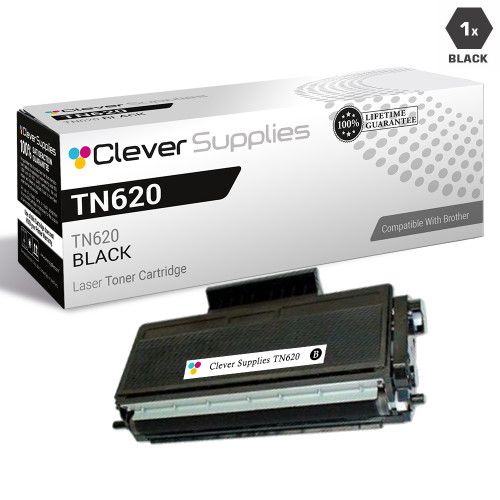 brother tn620 laser toner compatible cartridge black
 brother dr620 laser drum unit compatible cartridge
Key takeaways
- The top cartridge here is rated at 8,000 pages — fewer swaps, lower cost per page.
- Lowest cost per page in this family: ~0.96¢ with the highest-yield cartridge.
- Toner and drum are separate parts on this printer — replace only the one the printer asks for.
Other Printers That Use TN620, TN650 and DR620
- HL-5350DN
- HL-5370DW
- HL-5380DN
- DCP-8080DN
- DCP-8085DN
- MFC-8480DN
- MFC-8680DN
- MFC-8690DW
- MFC-8880DN
- MFC-8890DW
One spare cartridge genuinely covers this whole family, including the ten relatives above. Start from our HL-5340D toner page, which lists every cartridge and drum that fits this machine.