




What Toner Does the Brother HL-L9310CDW Use?
Nov 2nd 2026
Quick answer: The Brother HL-L9310CDW uses four toner cartridges — black, cyan, magenta and yellow — from Brother's TN43x family. The largest is the ultra high-yield TN439 (TN439BK, TN439C, TN439M, TN439Y), rated at about 9,000 pages in every color. Below it sit the super high-yield TN436 at about 6,500 pages per cartridge, the high-yield TN433 (about 4,500 pages black, 4,000 per color) and the standard TN431 (about 3,000 pages black, 1,800 per color). All four sizes share one slot design, and beneath them sits a single DR433CL drum unit rated at roughly 50,000 pages.
A Printer Built Around Cheap Pages
Brother sells the HL-L9310CDW through its Workhorse channel to mid-sized workgroups, and the pitch is running cost rather than sticker price. The machine prints at up to 33 pages per minute in color and black, duplexes automatically, and carries an integrated NFC card reader, Gigabit Ethernet and Wi-Fi for offices that authenticate users at the device. Brother rates it for up to 6,000 pages a month, and it leaves the factory with the 6,500-page TN436 cartridges already installed — the first toner decision most owners face is not which cartridge to buy, but whether to step up a size when the factory set finally empties.
Yields, Color by Color
| Cartridge | Black | Cyan | Magenta | Yellow |
|---|---|---|---|---|
| TN439 (ultra high yield) | ~9,000 pages | ~9,000 pages | ~9,000 pages | ~9,000 pages |
| TN436 (super high yield) | ~6,500 pages | ~6,500 pages | ~6,500 pages | ~6,500 pages |
| TN433 (high yield) | ~4,500 pages | ~4,000 pages | ~4,000 pages | ~4,000 pages |
| TN431 (standard yield) | ~3,000 pages | ~1,800 pages | ~1,800 pages | ~1,800 pages |
Yields are Brother's ratings under ISO/IEC 19798 at 5% coverage. One quirk of this family is worth noticing: unlike most printers, where black outlasts the colors, Brother rates the TN439 and TN436 identically in all four colors — a color-heavy office gets the same mileage from a cyan cartridge as from the black.
What Each Size Costs per Page Here
Prices below were read from our compatible product pages on November 2, 2026:
- TN439 black: $29.49 ÷ 9,000 pages ≈ 0.33 cents per page
- TN439 colors: $32.59 ÷ 9,000 pages ≈ 0.36 cents per page
- TN436 black: $27.55 ÷ 6,500 pages ≈ 0.42 cents per page
- TN436 colors: $29.46 ÷ 6,500 pages ≈ 0.45 cents per page
- TN433 black: $28.39 ÷ 4,500 pages ≈ 0.63 cents per page
- TN433 colors: $28.39 ÷ 4,000 pages ≈ 0.71 cents per page
Read the table from the bottom up and the pattern is plain: the mid-size TN433 costs nearly as much per cartridge as the TN439 while delivering less than half the pages. On a printer designed for thousands of pages a month, the ultra high-yield size is where the running-cost argument is won.
Every Cartridge, With Its Own Link
You replace only the color that runs dry. Each part number below goes to that cartridge's own product page:
Ultra high yield (TN439)
Super high yield (TN436)
High yield (TN433)
Swapping a Cartridge
With the printer on, open the front cover and slide the drum-and-toner tray out toward you. Find the unit for the empty color, press its green lock lever, and lift the spent cartridge free. Rock the replacement from side to side a few times, peel off the protective cover, and lower it into the same unit until the lever snaps back. Before pushing the tray home, slide the green tab on that drum unit across and back to clean the corona wire, making sure it settles at its home mark. Close the cover and let the machine return to Ready. Each color is independent — a cyan swap never requires touching the black unit.
The Four-Color Set, Honestly Weighed
Our compatible TN439 four-color set was $79.02 when checked, against $127.26 for the same four cartridges bought separately — a saving of $48.24, which is the largest set discount in this family. The set earns its keep when several colors are running low together, a common moment after the factory TN436 set ages out, since all four were installed on the same day. The counter-case still applies: if magenta alone is empty and the other three cartridges show most of their life remaining, the single magenta at $32.59 is the correct order, and the set's other three cartridges would only sit in a cupboard aging.
The Drum Is a Separate, Slower Story
The cartridges click into the DR433CL drum unit, a four-color drum assembly Brother rates at approximately 50,000 pages on typical multi-page jobs (around 30,000 pages if nearly every job is a single page). That is roughly five full rounds of TN439 toner, so drum messages are rare events. One honest note about sourcing: we do not currently carry a compatible DR433CL, so there is deliberately no drum link in this guide — when the printer eventually asks for one, that is a genuine Brother part to source by its exact number. Repeating defects spaced evenly down the page, or a gray haze a fresh cartridge does not cure, are the usual signs the drum — not the toner — is the part wearing out. Deeper still, a WT330CL waste toner box (about 50,000 pages) collects stray toner and is the part behind a "waste toner box full" message years down the road.
Questions HL-L9310CDW Owners Ask
Can I mix sizes — say, a TN439 black with TN436 colors? Yes. The four slots are independent and every TN43x size fits any slot, so many workgroups upgrade the black first and let the colors follow as they empty.
My printer came with TN436 cartridges. Must I stay with that size? No. The factory set is simply what Brother bundles. The TN439 fits the same slots and stretches each change from about 6,500 pages to about 9,000.
Does the HL-L9310CDW scan or copy? It does not — this is a print-only machine. The all-in-one sibling with the same supply shelf is the MFC-L9570CDW, linked below.
Why does the printer say a color is empty when my pages are mostly black and white? Color cartridges are also consumed by calibration cycles and by the small amounts of color toner used to keep black text rich on many drivers' default settings. Printing in a true monochrome mode slows that drain.
How long should the drum last in a real office? At Brother's recommended ceiling of 6,000 pages a month, 50,000 pages works out to roughly eight months of drum life at maximum pace; lighter offices will measure it in years.
Key takeaways
- The top cartridge here is rated at 9,000 pages — fewer swaps, lower cost per page.
- Buying the set instead of the individual cartridges saves $48.24.
- Toner and drum are separate parts on this printer — replace only the one the printer asks for.
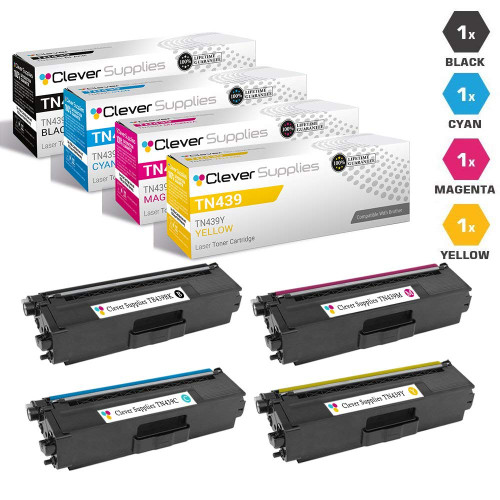 brother tn439 toner cartridge 4 color set tn439bk tn439c tn4
Other Printers That Use TN439
The same TN439 cartridges — and the rest of the TN43x shelf — also fit: HL-L9310CDWT, HL-L9310CDWTT, MFC-L9570CDW and MFC-L9570CDWT. A spare set on the shelf covers any of them.
Ready to order? Start from our HL-L9310CDW toner page, which lists every cartridge and set that fits this printer.